

CERTIFICATES Email Notifications
Table of Contents
Introduction
Leon sends email notifications about the certificate expiry date to selected users (Managers or OPS) as well as to the certificate’s owner (a particular crew member) according to pre-defined time intervals.
Go to panel Settings > Crew Certificates, tab Mailing Rules to set it up accordingly.
Email Notifications
In this section you can define rules for receiving notifications from Leon about the expiration of the crew certificates.
You can set as many rules as you need. You can add different recipients (i.e. users who manage crew certificates or particular groups of certificates).
It is also possible to make Leon send notifications to the certificate’s owner (crew member). In this case you can set different intervals and a notification email will be sent to the owner regarding all his certificates.
.png?cb=8489bb125036090e3a9fafd6706dbc8b)
Defining rules
To define rules for sending email notifications regarding the expiration of certificates you need to follow these steps:
-
In the section Settings open Certificate notification rules drop-down box, click Add new rule and name the rule in the column Basic settings > Rule name.
-
Set intervals (how many days before the expiry date of the selected certificate, emails should be sent) for this particular rule.
-
When the Notify also about already expired option is enabled, the system will send notifications about all expired certificates up to 92 days after their expiry date. Once this period has passed, no further notifications will be sent for those certificates.
-
Add recipient and select a person/persons to whom notification emails should be sent.
-
Mark Functional groups for this particular rule - cabin, cockpit, ground, or maintenance (don’t leave groups unmarked, as Leon will not send a notification not knowing whom it should concern).
-
Select appropriate certificates which should be included in the email notification.
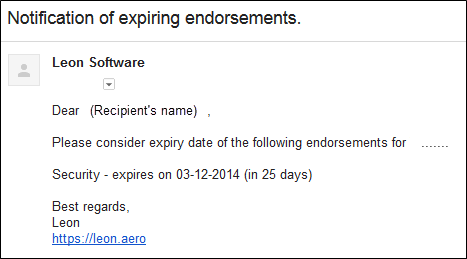
Once all is set & defined, Leon will be sending notifications emails to your inbox with the header Notification of expiring endorsements. Inside the email you will find an information about the expiry date of certificates.
Visa Documents will send the notification about the expiry of the Visas that are connected to the User Passport in a User profile.
Separately you can define Leon sending email notifications about the expiry of Practical Training & Online Training by marking those 2 checkboxes and inserting intervals.