

Flight editing
Table of Contents
Flight editing tab can be found in Settings panel.
Here we have settings helping in the process of adding and editing flights. The most important ones at this stage are:
• Trip edit scheme - allows setting PAX/Cargo or both as default values to be entered into the EDIT TRIP panel.
• Check airport opening hours - Leon can monitor airports opening hours and show a warning if you try to add a flight where STD/STA is outside the opening hours.
-
Show max range exceeding warning - max aircraft range can be defined in an aircraft edition page.
-
Require manual enabling of FDP+, Require manual enabling of rest reduction, Require manual enabling of split duty - these are 3 FTL settings which allow manual setting FDP extension, rest reduction or split-duty enabling. If checkboxes are unticked - Leon will apply them automatically.
-
Show TBC (To Be Confirmed) option on the flight - when enabled, Leon will show TBC in OPS > CALENDAR panel (only).
-
STD/STA editing - keep block time - any modification of STD and STA values does not affect the change of Block Time.
-
Use current time as ETD estimation in FTL for delayed flights - when enabled, the FTL of delayed flights will be updated every few minutes to take the delay into account in ETD estimation, until the FW is filled.
-
Trip type settings - in this section you can activate particular trip types, mark which ones should be Commercial as well as set up a default trip ICAO type.
Flight time suggestions based on
Here you can enable the source of suggesting the flight time (STA):
-
GCD - automatically calculates the suggested arrival time (STA) for a flight, based on the shortest distance between airports along the surface of the Earth.
-
GCD - historical average winds - winds dataset used by Leon comes from the NOAA Physical Sciences Laboratory (USA), which constantly updates data for predicting winds worldwide.
-
Historical flights - calculates flight times based on specific routes performed on selected aircraft types within a specific timeframe. The calculation requires at least 4 flights on the same aircraft type, scheduled closest to the date of the flight being calculated.
-
RouteFinder - built-in flight time calculation method that uses actual routing data (airways, restrictions) rather than just straight-line GCD distance or historical averages.
-
ForeFlight - it doesn't calculate the time internally within Leon, but instead relies on the ForeFlight Dispatch integration to retrieve the flight time externally via API. Make sure the ForeFlight integration is configured and the aircraft are included in the integration.
Custom Delay Codes
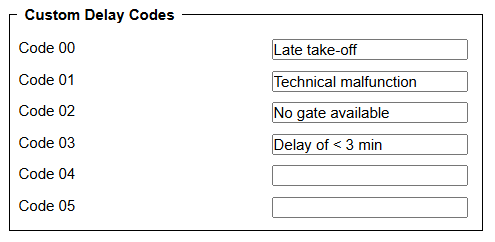
Here you can define your own Delay Codes (from 00 to 05), which then will be used in Journey Log and Flight Watch. All the other codes are sourced from the database.