

Handling Requests Settings
Handling Requests settings are found in the Admin panel, section Handling Requests.
• Test settings – we recommend having this ticked for the testing period as it will allow testing the Handling Request functionality without the risk of sending the requests to an actual handler. When this box is ticked and you issue a handling request in the schedule, the handling request form will display a yellow belt informing that the test mode is on and you are ok to send this handling request – the request will be sent to your own email instead of the handler’s email. If there is no belt, the test mode is off.
-
Callsign - in a case, you would want to use different callsign style for your flights in your Handling Requests, than in other parts of Leon, you can override this setting here. Choosing Flight Number means, that no changes will be made.
-
Handling requests status changes - determines what changes also change status of related handling requests to the red status '?'.
• Handling Request Emails - in here you can set up default information for each handling request sent out from Leon. That includes emails – „From”, „CC”, „BCC”, ect., your company information, tel. numbers, addresses as well as some default handling request content like items to be arranged, billing information or a footer. All of those can be later edited on an actual handling request.
Sending Rules
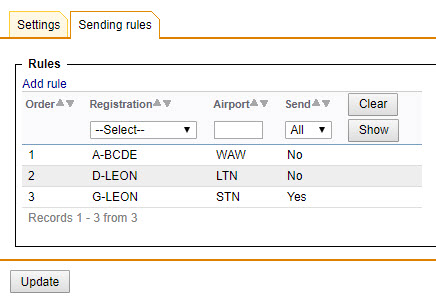
In this section, you can define whether Leon should enable or disable sending HR emails for the entire fleet or a particular aircraft to a particular airport/airports.
By clicking a link Add rule you can select the aircraft registration, an airport, whether HR emails should be sent or not and the order.
Requested Items
In this section you can specify default requested items that will appear on all Handling Requests. These can also be specified per aircraft in the fleet settings. If you decide to set up different requested items for individual aircraft, please make sure to mark those aircraft in the Handling Request Settings page, so that system can overwrite the settings for all Handling Requests.
Billing Info
Insert the Billing Info details which should show on the Handling request panel.
It is possible to add it separately per a tail.
Click below to watch a detailed tutorial on the above: