

‘Flight change’ feature modifications
Table of Contents
Changes to the ‘Flight change’ feature in the OPS module will be introduced.
New colour coding
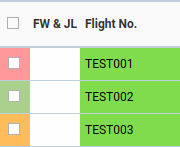
The colour coding used in that feature will be changed for a better reflection of its logic. It is explained in the table below.
|
Old
|
New
|
Meaning |
|---|---|---|
|
New - the flight has been created and hasn't been acknowledged yet |
||
|
Acknowledged - the flight is acknowledged and there are no new changes |
||
|
Changed - the flight was acknowledged already but has been changed after that |
The changes which trigger the status change from ‘acknowledged’ to ‘changed’ are as before:
-
aircraft
-
flight number
-
airports
-
times
-
crew
In OPS Table, the ‘Flight change’ column has to be enabled in View Settings - Columns.
Feature added to OPS Calendar and OPS Timeline
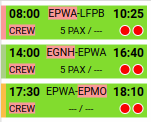
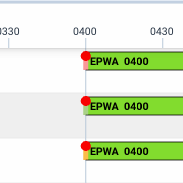
The feature, previously present in OPS Table, will be added to OPS Calendar and OPS Timeline as well. In both cases, the status will be indicated as a colour-coded left border of the flight.
Dedicated button in the context menu
The status will be changed to ‘acknowledged’ by clicking the corresponding button in the context (right-click) menu of the flight.
The buttons will appear only if the status is different than ‘acknowledged’.


The status will not be automatically changed to ‘acknowledged’ on generating the Flight Order document anymore.