

FTL Violations
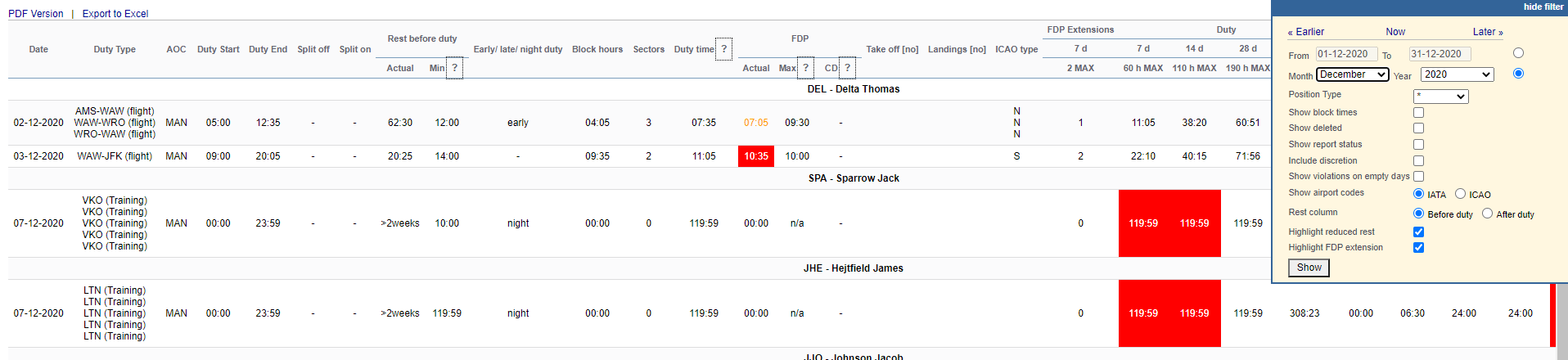
This report shows all FDP, Duty, and Rest violations along with Cumulative duty or Block time violations in a selected period of time in the filter.
In the filter, you can select available options:
-
Drafts - toggle ON / OFF - the report can now be generated from draft data
-
Position type - select between cockpit & cabin.
-
AOC - can be used by the operators with more than 1 AOC rule applied in the FTL Settings. Allows filtering the report by a specific AOC
-
Show block times - a new column will show crew block times in FROM-TO format (i.e. 12:00 - 15:40).
-
Deleted trips - displaying deleted trips in the report.
-
Report status - Leon will show a checkbox ‘Report received’ to be marked (click ‘Submit’ once it's marked).
-
Include CD - Leon will show the ’ Commander’s Discretion’ column with the max FDP extension due to CD marked in the Journey Log.
-
Show violations on empty days - showing Days off violations on days without duties.
-
Show airport codes - selection between ICAO & IATA codes.
-
Rest column - Leon can show either ‘Rest before duty’ or ‘Rest after duty’.
-
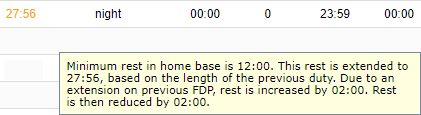
Highlight reduced rest - rest reduction cases will be highlighted in yellow (see screenshot below). If the checkbox is unticked, reduced rest records will not show in the report
-
Highlight FDP extension - FDP+ cases will be highlighted in yellow. If the checkbox is unticked, FDP+ records will not show in the report
-
Registration - filtering by the aircraft registration assigned to the FDP

-
Approved - checkbox that allows indicating if the violation was approved (as a Commander’s Discretion)
-
Violation note - field to insert the reason for violation or information about the approval of Commander’s Discretion. Once inserted, it appears in the OPS section in the CREW tab > FTL Calculations subsection. Example in the screenshot on the right
You can export this report data to PDF or Excel format.