

Default rotation time
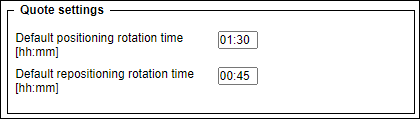
It will be possible to set the default rotation times for positioning/repositioning flights.
The settings will be available in the Admin Panel > General Settings > ‘Sales module’ tab
Default rotation time settings will be divided into two options:
-
Default positioning rotation time [hh:mm] - setting up the aircraft rotation time before the first flight with PAX within the request
-
Default repositioning rotation time [hh:mm] - setting up the aircraft rotation time after the last flight with PAX within the request
Those default rotation times will not apply when:
-
adding a fuel stop
-
performing a feasibility check
-
adding legs manually within the itinerary
EXAMPLE
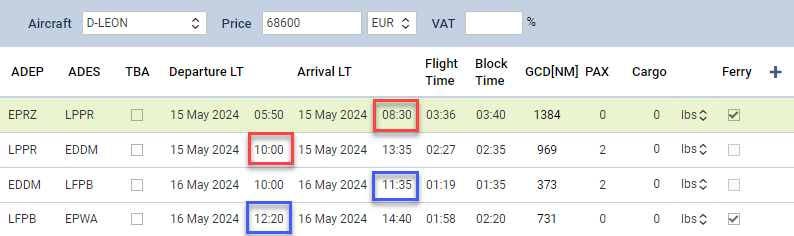
In the example, the following is set up:
-
Default positioning rotation time [hh:mm] - set to 01:30
-
Default repositioning rotation time [hh:mm] - set to 00:45
-
Positioning flights policy - option in the aircraft settings > ‘SALES’ tab is set to ‘Fixed’
As presented in the screenshot:
-
Rotation time between positioning and the first sector with PAX equals 01:30
-
Rotation time between the first sector with PAX and the repositioning equals 00:45