

Certificates revalidation
A more convenient way of revalidating the certificates will be introduced.
The revalidation action buttons will be available in the following sections in Leon in the ‘Actions’ columns:
-
CREW QUALIFICATIONS - CERTIFICATES

-
FULL USER PROFILE - CERTIFICATES

Revalidation buttons are only available on the certificates with the expiry date inserted, regardless of the certificate being expired ot not.
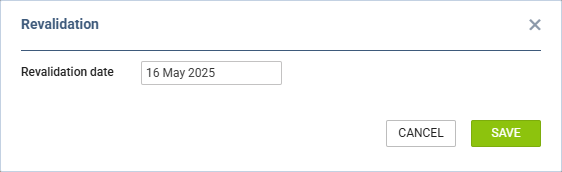
Revalidating a certificate is very easy:
-
Click on the revalidation action button
-
Select a Revalidation date, if different from the selected one
-
Press ‘SAVE’ to revalidate the certificate
Once the new revalidation date is saved, the certificate should be revalidated based on the certificate configuration
Example
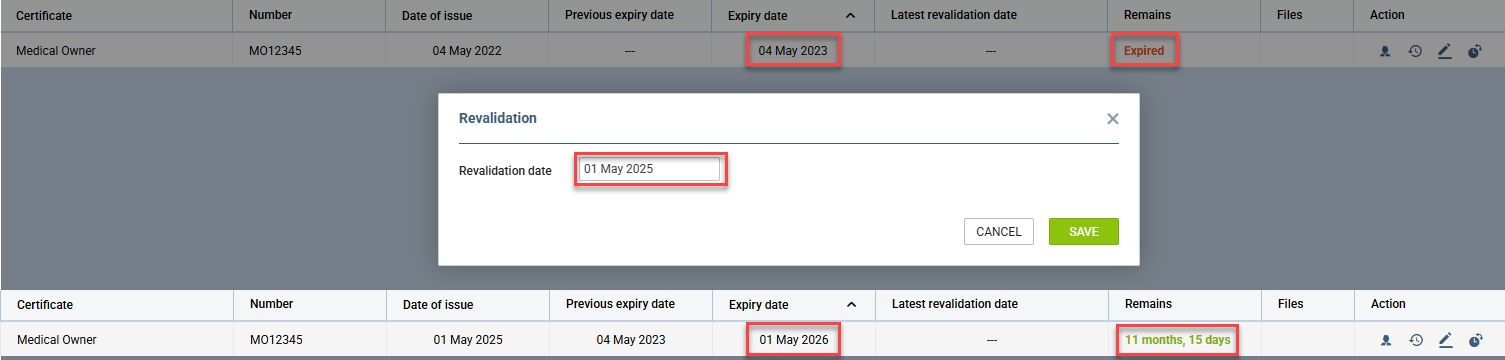
The following certificate setup is applied:
-
Validity time is set to 12 Months
-
Revalidation window is set to 50 on the Exact day
-
The crew certificate expired on 04-05-2023
The certificate is revalidated manually, with the revalidation date set to 01-05-2025.
The new expiry date is set to 01-05-2026.