

Overview
Journey Log elements can now be configured to appear only for flights operated from specific bases (offices). This adds a new layer of targeting — complementing the existing per-aircraft setting — so operators with multi-base operations can define precisely which elements are relevant at each location.
What's New
Per-Base Assignment for JL Elements
Each Journey Log element in Admin Panel > Journey Log can now be assigned to one or more operational bases. When a base is selected, the element will appear in the Journey Log only for flights departing from (or assigned to) that base.
This setting is independent of the per-aircraft configuration — both filters can be used on the same element at the same time.
How the base is determined
Leon uses the following priority when evaluating which base applies to a given flight:
-
Base set on the flight — if a specific base is assigned directly to the flight, that base is used.
-
Base set on the aircraft — if no base is set on the flight, Leon falls back to the base configured for the aircraft.
If neither is set, the element is evaluated using the standard per-aircraft logic only.
Configuration
-
Go to Admin Panel > Journey Log.
-
Find the element you want to configure, then click it to open its settings.
-
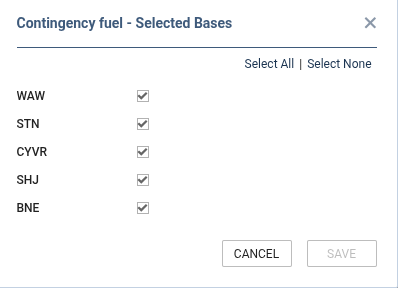
In the element's configuration panel, locate the Bases field.
-
Select one or more bases (offices) for which this element should be active.
-
Save the changes.

Note on deleted bases: If a base is removed from the operator's configuration after being assigned to a JL element, it will still appear in the element's settings marked as *** (Deleted). The assignment remains in place but does not affect flight visibility. You can remove it manually by editing the element's base list.
When bases are configured for a JL element, changes are recorded in the Journey Log Settings History, including the list of selected bases.

Why It Matters
-
Multi-base operations: Different bases may have different operational requirements or local regulatory needs. Per-base filtering ensures that crews see only elements relevant to their location.
-
Cleaner JL forms: Reducing irrelevant fields improves data quality and speeds up Journey Log completion.
-
Flexible targeting: The combination of per-aircraft and per-base conditions covers complex fleet/base setups without needing duplicate element definitions.