Overview
Leon now supports multiple configurations of the same crew currency type. This allows operators to define different parameter sets — such as different required counts of take-offs or landings — under a single currency type, each identified by a unique label.
This is particularly useful when the same type of currency applies to different aircraft in an operator's fleet but with different thresholds. For example, an operator may need:
-
90-day night currency — 3 take-offs (A/C type 1)
-
90-day night currency — 1 take-off (A/C type 2)
Both configurations belong to the same currency type but can now coexist independently.
Configuration in Settings
In the Crew Currency settings, currencies of the same type are now presented as a group. The group header shows a generalised name of the currency type (with placeholder values instead of specific numbers). Within the group, each row represents one specific configuration with its actual parameter values and label.
Process of adding the configuration:
-
To add a new configuration to an existing currency type, use the + icon next to the group header.

-
A pop-up window will appear where the new Label can be added, as well as the new thresholds for this currency configured
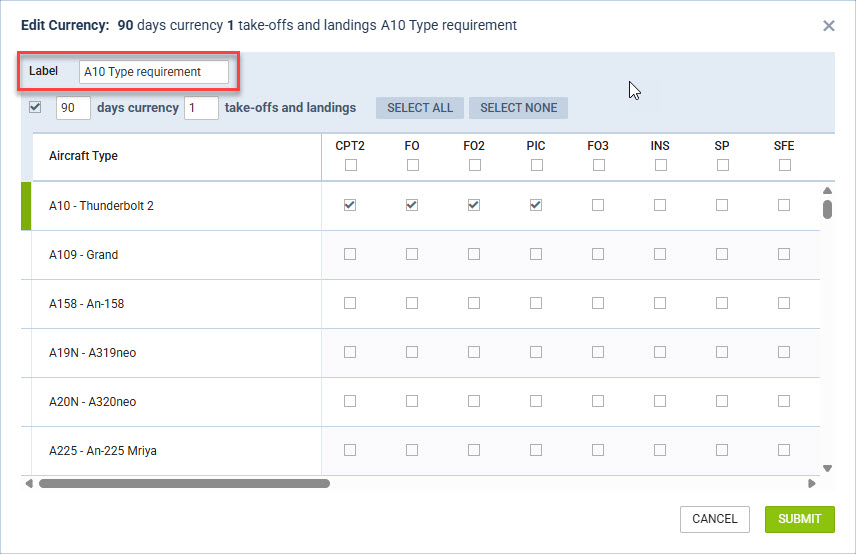
-
Once the new configuration is saved, it will show as a new position within one currency:

To remove a specific configuration, use the trash icon on its row.

Groups that have been defined but contain no active configurations are displayed at the bottom with a red left border.
The label must be unique within the same currency group. Leon will display a validation error if you attempt to save two configurations with the same label under one currency type.
How it works
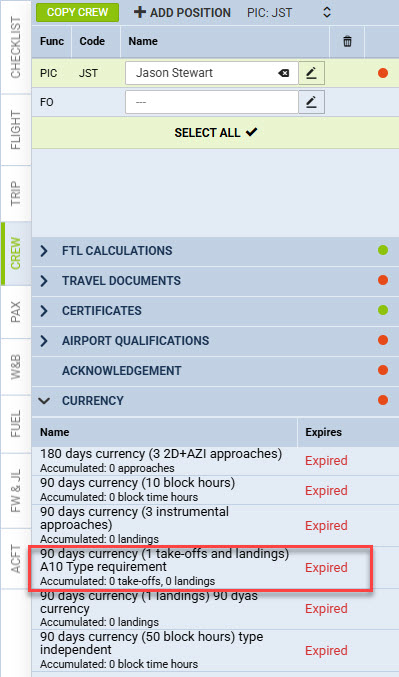
Each configuration within a currency type is distinguished by a label that must be unique within that group. The label appears as part of the currency name wherever it is displayed in Leon including flights, currency reports, for example: