

Overview
Leon now supports attaching a feedback form link to training duties and allowing crew members to mark their training as completed directly in the Crew App. A push notification system reminds crew of outstanding trainings they have not yet completed.
Duty Definition Configuration
When setting up a duty definition of type Training, administrators can now configure two additional options:
-
Feedback Form URL — a URL pointing to an external feedback form related to the training. The field accepts any valid URL.
-
Allow marking as completed in Crew App — a toggle that enables crew members to mark the training as completed from the Crew App.
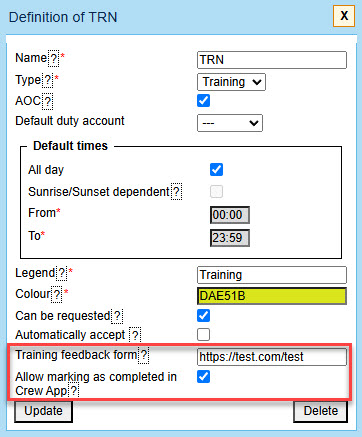
Both fields are visible only for duty definitions of the Training type.
Crew App
When a crew member opens a training duty in the Crew App, the following is displayed based on the duty definition configuration:
-
If a Feedback Form URL is set, a clickable link to the form is shown within the duty view.
-
If Allow marking as completed in Crew App is enabled, a Training Completed checkbox is displayed. Crew members can check or uncheck it at any time.
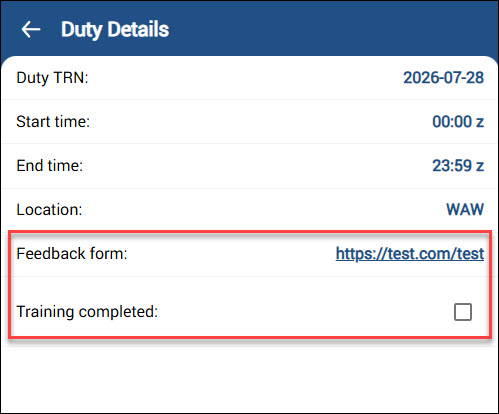
The completion status is saved immediately upon checking or unchecking the checkbox. It is visible to the crew member in the Crew App only.
Push Notifications
If “Allow marking as completed” in Crew App is enabled on the duty definition, Leon automatically sends a push notification reminder to the crew member once the training has ended and has not been marked as completed. Reminders are sent for up to 7 days after the training end time and stop as soon as the crew member marks the training as completed. Tapping the notification opens the training duty in the Crew App. No additional setting in Operator Settings is required.