

Owner Board
Owner Board settings allow selecting specific preview access levels to specific items within the Owner Board view.
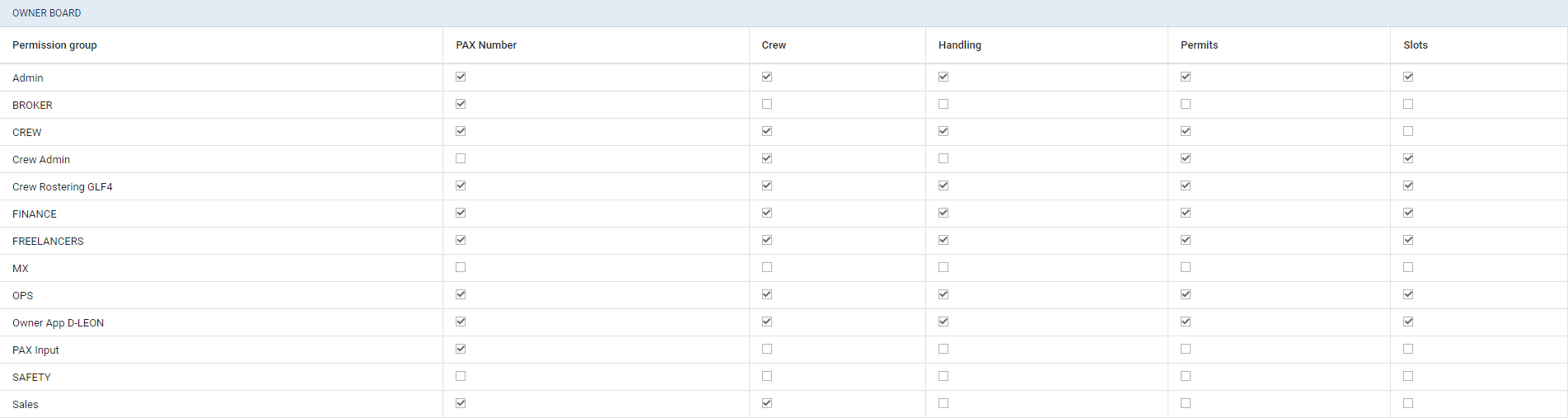
These specific access levels are assigned to the groups of privileges (left column in the table).
Currently, there are following columns available within the ‘Owner Board’ settings:
-
PAX Number
-
Crew
-
Handling ADEP
-
Handling ADES
-
Permits
-
Slots
Selecting the checkbox within either column for a group of privileges will affect the relevant details within the flight tile in the ‘Owner Board’ view.
Clicking/unclicking the checkbox will save the changes to the settings automatically.
Example

As you can see in the below screenshot, some settings were changed for the ‘Owner D-LEON’ group of privileges, as follow:
-
Handling - switched off
-
Permits - switched off
-
Slots - switched off
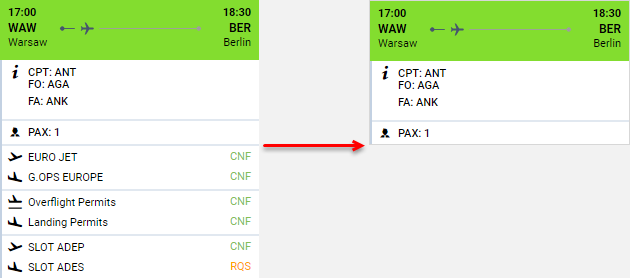
In the screenshot on the right-hand side, the preview in the ‘Owner Board’ view was limited to:
-
Schedule
-
Crew details
-
PAX number
Based on the settings, Handling, Permits, and the Slot details were removed from the preview.