

Automatically mask users
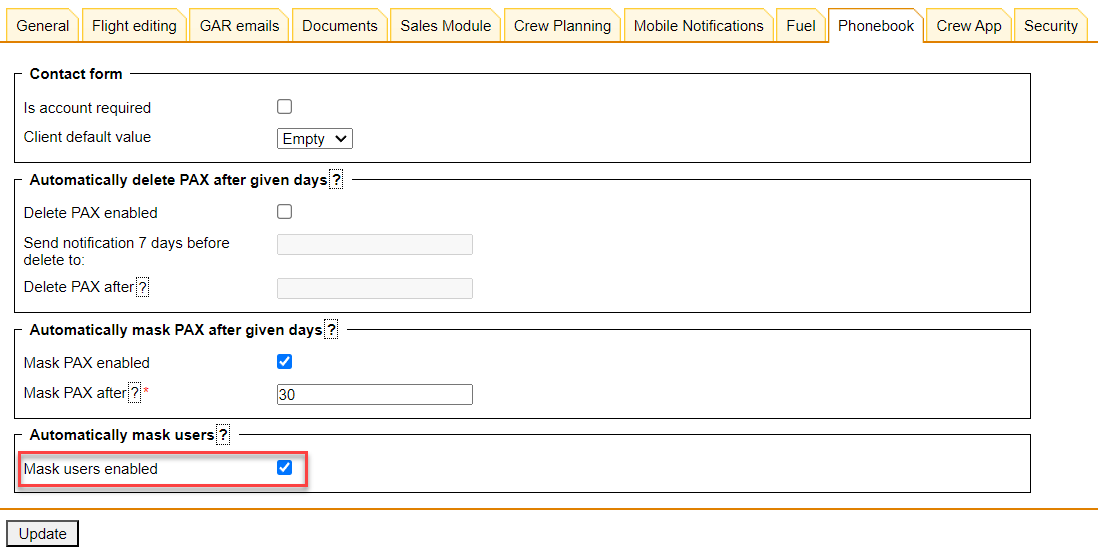
The option to mask Users will be available in the ‘Admin Panel’ > ‘General Settins’ > ‘Phonebook’ tab
The Mask users enabled function automatically masks contact information for all user profiles which enhances data privacy and security.
When enabled, all inactive user contacts will be masked. To restore the visibility of masked contact, users with the ‘Contact mask’ privilege can do so through the Phonebook panel or Users section.
* Mask users enabled - Activates the functionality
A User with the Contact Mask privilege set to ‘EDIT’ will be able to:
-
preview the masked details in the user profile by clicking on the

-
unmask the details by clicking on the ‘UNMASK’ option in the PAX profile and saving changes
If a User’s Contact Mask privileges are set to DENY, the user will see the 