

My Schedule
This panel shows assigned flights, positionings, office duties, standby duties, training - including duties added in the roster, such as: holiday, day off, sick, etc…
In the filter, you need to select a period of time. You can also set times to be displayed in UTC, Base LT (defined in Crew profile) or LT (local time of ADEP & ADES). You can also show aircraft registration right below aircraft type or show crew on PAD position.
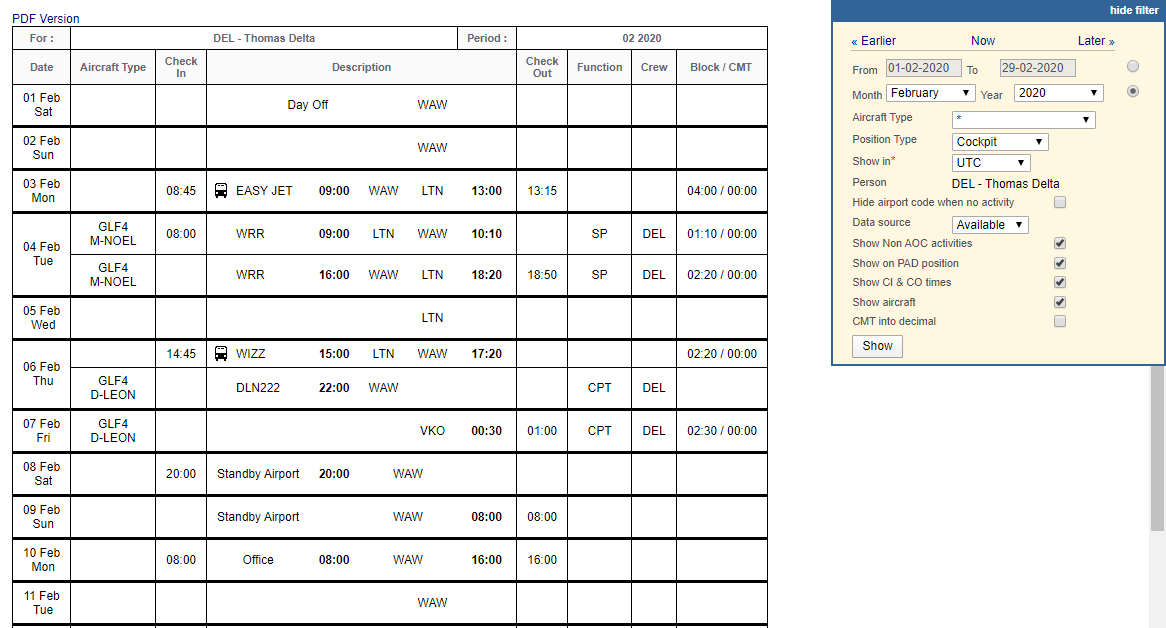
The screen shows data such as:
-
Crew code/name & period of time - on top of the page
-
Day of the week
-
Aircraft type/registration
-
Duty description - duty type, schedule, airport codes
-
Function - CPT, FO, etc…
-
Crew - all assigned crew codes
-
Block/CMT - block time/commercial time (which can be inserted to the Journey Log) - an option to view CMT in decimal is available to be switched on in the filter.
At the bottom you can find summary of the block time done by a particular crew member:

The screen can be exported to PDF file, but it is also possible to click on All to PDF in the filter - it means that all crew members would get exported to PDF.