

An ‘Admin’ column and filter are available in the main ‘Users’ section overview.
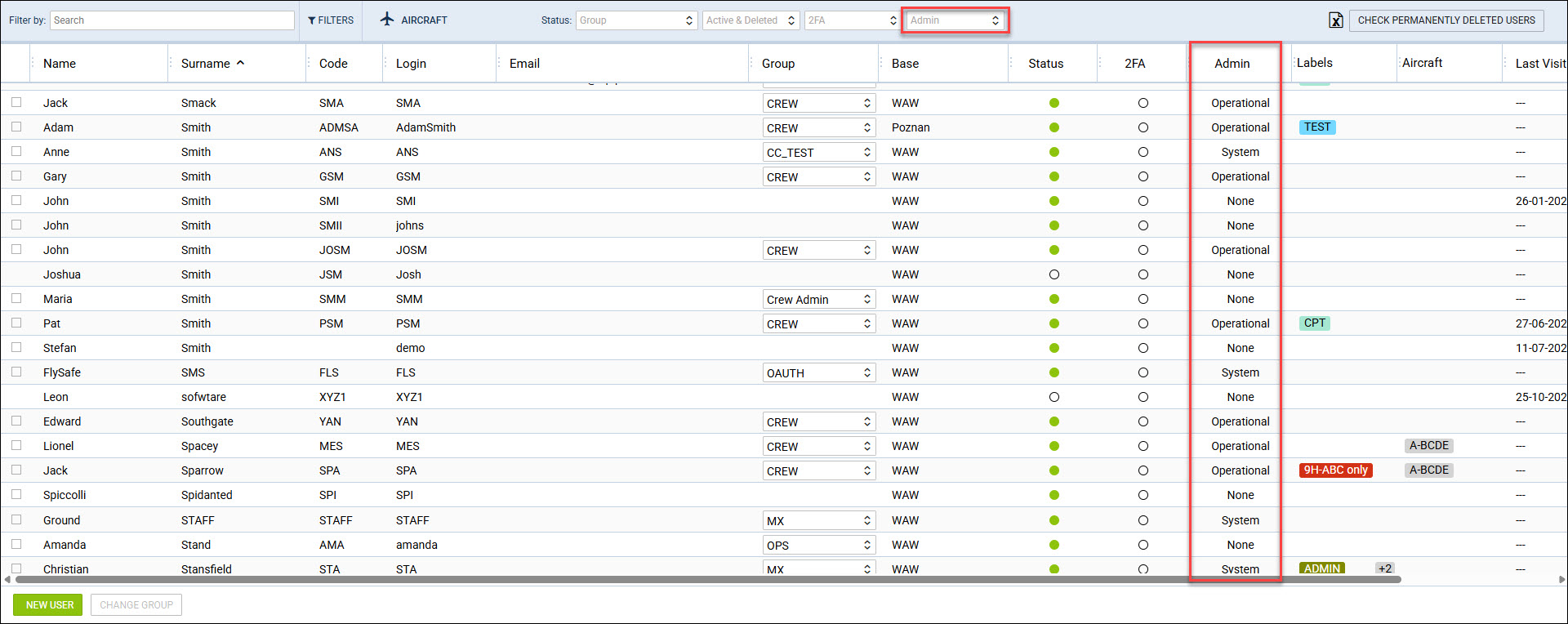
Considering that the Privileges group names can be changed to any given name, this column allows to quickly recognise a user with the relevant Administrator privileges.
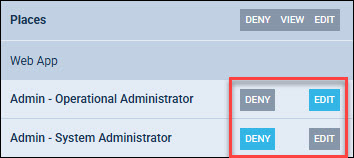
The ‘Admin’ column displays the user admin status based on the ‘Admin - Operational Administrator’ and the ‘Admin - System Administrator’ selection in the group privileges.
The following indications are displayed in the Admin column:
-
System - user assigned to a group with the ‘Admin - System Administrator’ set to EDIT
-
Operational - user assigned to a group with the ‘Admin - System Administrator’ set to DENY, and the ‘Admin - Operational Administrator’ is set to EDIT
-
None - user assigned to a group where both the ‘Admin - System Administrator’ and the ‘Admin - Operational Administrator’ are set to DENY
Additionally, it is possible to filter by the Administrator status in the filter ‘Admin' located at the top of the overview.