Custom airports
If you are a Leon user with admin privileges you can manually add custom airfields to Leon.
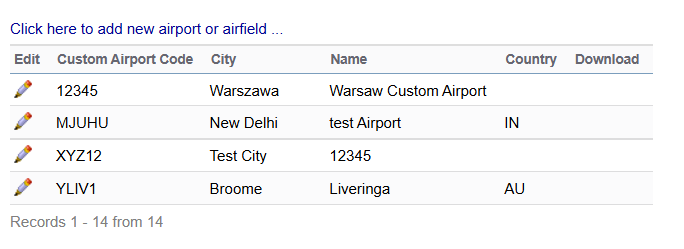
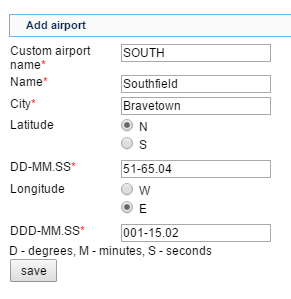
Go to a section OPS > Custom airports and then the link ‘Click here to add new airport or airfield’ to add a new entrance. All fields must be filled in as described below.
-
Custom airport name - 5-digit code - letters or/and numbers (airfield’s ICAO code)
-
Name - airfield’s name (if not know, enter its location)
-
City - nearest city name
-
Latitude - inserted in the format DD-MM.SS
-
Longitude - inserted in the format DDD-MM.SS
Use top-right corner filter to search for already added custom airports/helipads.
All added custom airports will show on the main page and are available to be edited, by clicking the pen-icon on the left.