

Delete Data
Important: Use Delete Data only when you are sure that the selected old data should be permanently removed. Data deleted or overwritten from this panel cannot be recovered.
Delete Data is available in Admin Panel > System > Delete Data. It allows a system administrator to manually clean up selected types of old operational data.
This page explains what the Delete Data section is for, what options are available, and how to use it safely from the user interface.
The section is designed for removing old historical details that are no longer needed, such as PAX list data and checklist comments from past flights.
Who can use this section?
Delete Data is available only to users who have access to the System section of the Admin Panel and the required administrator permission.
How to use Delete Data
-
Open
Admin Panel > System > Delete Data. -
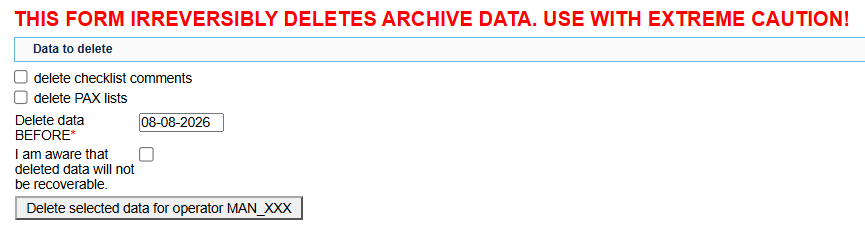
Select one or more actions that you want to run.
-
In Delete data BEFORE, choose the cut-off date. Only data older than this date will be processed.
-
Read the warning carefully.
-
Tick I am aware that deleted data will not be recoverable.
-
Confirm the operation.
Available options
The Delete Data section currently contains two options.
- delete checklist comments
Use this option to remove comments from checklists related to old flights.
This option can apply to both single-leg and multi-leg trip checklists.
- delete PAX lists
Use this option to remove passenger list details from old completed flights.
When this option is selected, passenger details that match the deletion criteria are replaced with (deleted). This means the previous passenger data is no longer available in the system.
Use this option only when old PAX list data is no longer needed for operational, reporting, or audit purposes.
What happens after confirmation?
After you confirm the operation, the system processes the selected option or options for data older than the selected date.
The affected information is permanently deleted or overwritten with (deleted). There is no undo option in the user interface.
Summary
Delete Data is a manual clean-up tool for old operational details, specifically PAX list data and checklist comments from past flights.
Only authorised administrators can run it. Because the result is permanent, always verify the selected option and date before confirming the operation.
FAQ