

Overview
Leon allows operators to automatically archive passenger lists from past flights after a configurable number of days. This helps operators manage personal data retention in line with their internal policies and data protection requirements.
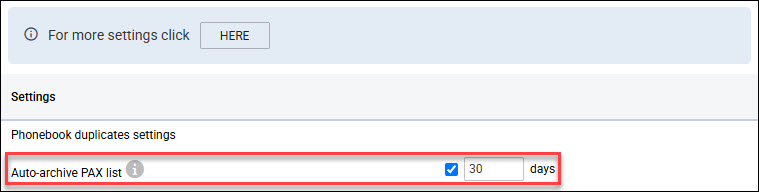
The feature is configured in the Admin Panel > Phonebook.
Important: Enabling automatic PAX archiving may affect external integrations that rely on passenger data. Before activating, verify that your integrations will not be broken by the removal of passenger contact information.
Configuration
An administrator with the Operator General Settings Edit permission can enable the feature and set the number of days after departure after which the PAX list is automatically archived. The minimum value is 30 days. Setting the field to empty disables the feature.
What archiving does
When a PAX list is archived, Leon:
-
Removes all passenger contacts and their details (name, document data, labels) from the flight.
-
Masking is performed automatically at 03:30 UTC on a daily basis
-
Retains the passenger count — the number of PAX on the flight is not affected.
-
Marks the list as archived so it is clearly identifiable in the OPS module.
Archived passenger data is retained in the Leon database and can be recovered via the Restore function.
Viewing archived lists in OPS
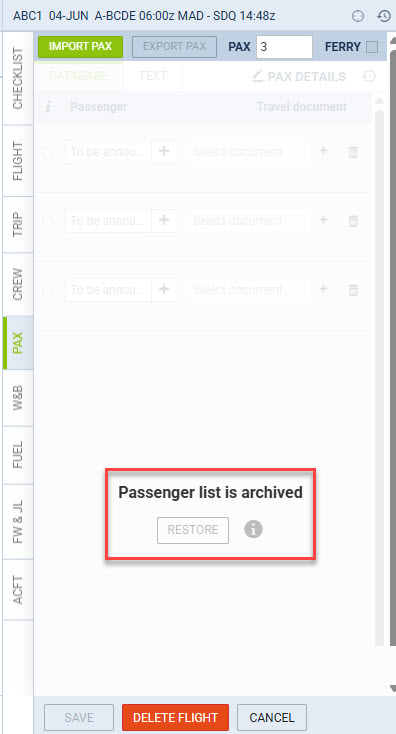
When you open the PAX tab for a flight whose list has been archived, Leon displays an overlay indicating that the list has been archived. Manual editing of the passenger list is blocked while it is in the archived state.
Restoring an archived PAX list
Users with the PAX Archived Restore permission can restore a previously archived list directly from the OPS > PAX view using the Restore button visible in the archived overlay. Restoring brings back all passenger contacts, details, and labels as they existed at the time of archiving.
After a manual restore, the list will not be automatically re-archived by the next scheduled run, allowing the user to review the data without it disappearing immediately.
Change history
The PAX list change history is not accessible while a list is in the archived state. A message is shown prompting the user to restore the list first in order to view its history.