

How Leon Modules Work Together
Leon is an integrated flight operations software platform in which Sales, scheduling, crew planning, training, maintenance and operational control use one shared database. Flights move between modules through three main hand-off points: trip booking, schedule publishing and roster publishing. This article explains what each module is responsible for, how information flows between them, and where the formal hand-over points (publication, booking, roster publishing) are located. The goal is to help you understand the system as a whole — not any single screen, but the workflow that connects them.
One database, separated workspaces
All Leon modules operate on one shared database and one common data model. A flight created in Sales or SCHED is the same flight object that OPS dispatches, Crew Planning staffs, and reports are built on. There is no synchronisation between modules, no export/import, and no duplication of records — a change made in one module is immediately visible everywhere it is relevant.
At the same time, each module is deliberately separated as a workspace. Every module presents only the data and actions needed for a specific role in the company. The design principle behind Leon is:
In an ideal setup, each employee role should be able to complete their daily work without leaving their module. A sales person works in Sales, a crew planner in Crew Planning, an OPS controller in OPS.
In practice this ideal is never reached 100% — in most operators people carry responsibilities across departments, and Leon fully supports that (access is controlled by privileges, not by rigid roles). But the separation is intentional: it keeps each department's view focused, and it makes the hand-over points between departments explicit and auditable.
Module summary
|
Module |
Primary role in the workflow |
Delivers to |
Consumes from |
|---|---|---|---|
|
Safe planning and execution of flights; final verification of the whole process |
Crew App (flight details), Reporting, Sales (JL data) |
Sales, SCHED, Crew Planning, Crew Training, MX/CAMO |
|
|
Quoting and contracting charter trips |
OPS, Crew Planning (booked trips) |
OPS (trip changes, Journey Log) |
|
|
Building and publishing timetables for scheduled operations |
OPS, Crew Planning (published flights), external DCS/PSS via SSIM |
— |
|
|
Staffing the delivered schedule; roster building |
OPS (crew assignments), Crew App (published rosters) |
Sales, SCHED, OPS (flights), Crew Training (qualifications) |
|
|
Crew Training (Certificates / Currency) |
Maintaining a pool of crew with valid qualifications |
Crew Planning, OPS (validity data, warnings) |
OPS (Journey Log — currency, recency) |
|
Aircraft availability, maintenance windows, and limits |
OPS, Crew Planning (warnings, conflicts) |
OPS (Journey Log — TAH/TAC counters) |
|
|
Delivering published information to crew; crew data entry |
OPS (Journey Log, acknowledgements, requests) |
Crew Planning, OPS, Crew Training, MX |
|
|
Cross-module read-out and analysis |
— |
All modules |
The modules and their responsibilities
OPS — the heart of operations
The OPS module (available in Table, Calendar, and Timeline views) is the operational centre of Leon. Everything the other modules produce — booked trips from Sales, published schedules from SCHED, published crew assignments from Crew Planning — converges in OPS.
OPS is ultimately responsible for the safe planning and execution of every flight, and for catching any error that may have been introduced anywhere earlier in the process. This is why OPS aggregates warnings and statuses from all other areas:
-
Checklist — OPS and Sales checklist items per flight, tracking the readiness of every service (permits, slots, handling, catering, fuel, crew documents).
-
Crew warnings — FTL violations, expired endorsements/certificates, and crew currency issues are flagged directly on the flight.
-
Aircraft warnings — conflicts with scheduled maintenance and CAMO limits appear as warnings when a flight is planned on an affected aircraft.
-
Flight Watch and Journey Log — real-time flight progress and post-flight data, which close the loop and feed reporting, invoicing, and maintenance counters.
|
Automation / process |
Description |
|---|---|
|
Automatic checklist generation |
Checklist items are added automatically per flight, based on flight type and configurable conditions (CQL rules). |
|
Schedule-change notifications |
Automatic e-mail/system notifications to defined recipients when flight details change. |
|
Cross-module warnings |
FTL, qualification, currency, maintenance, and CAMO warnings are aggregated automatically on each flight. |
|
Flight Watch → Journey Log |
Flight Watch times can be copied into the Journey Log; flight statuses update as FW data arrives. |
|
ASM/SSM messaging |
Automatic change messages for scheduled flights created in SCHED. |
Sales — delivering trips to operations
The Sales module (Requests/Quotes) handles the commercial side: receiving requests, quoting, negotiating, and contracting charter flights. Its purpose in the overall workflow is to deliver booked trips to OPS and the crew modules. Until a quote is booked, it is a commercial object only; once booked, it becomes an operational trip that OPS, Crew Planning, and Crew Training work on.
|
Automation / process |
Description |
|---|---|
|
Automatic quote pricing |
Prices are calculated from aircraft fees, airport charges, and fee scripts. |
|
Document generation |
Flight Brief, Charter Agreement, and other documents are generated from templates. |
|
Option due dates |
An unconfirmed (Option) trip is cancelled automatically if not booked by the due date. |
|
Quote ↔ trip synchronisation |
A booked quote updates the trip in OPS; trip changes in OPS can update the quote (Sales workflows and automation). |
|
Journey Log → quote update |
Quote timeframes and price can be recalculated from actual Journey Log data. |
|
Inbound requests |
Requests arrive automatically from external marketplaces (e.g. Avinode) and the Leon Marketplace. |
SCHED — delivering the timetable
The SCHED module is the counterpart of Sales for scheduled (timetable) operations. Its role is the same in principle: to deliver a flying programme to OPS and the crew modules — but instead of one-off charter trips, SCHED produces whole series of scheduled flights, created from patterns (days of operation, validity periods) or imported from SSIM files.
|
Automation / process |
Description |
|---|---|
|
Bulk schedule operations |
Creating, modifying, and deleting whole series of flights in one action. |
|
SSIM import/export |
Timetables imported from or exported to SSIM files. |
|
SSIM auto-sending |
SSIM files sent automatically to DCS/PSS/CMS systems after every schedule change of published flights. |
|
ASM/SSM messages |
Automatic change/cancellation messages for schedule modifications. |
|
Bulk checklist updates |
Checklist item statuses changed across multiple published flights at once. |
Crew Planning — staffing the delivered schedule
The Crew Planning module (Crew Calendar and Crew Timeline) takes the schedule delivered by Sales, SCHED, or OPS and is responsible for assigning crew to it — building rosters, planning duties, positioning, standby, and days off, while respecting FTL rules and crew qualifications.
Crew Planning does not create flights; it consumes them. Flights added in OPS appear automatically on the crew planning views, and crew assigned in Crew Planning appear immediately on the flights in OPS.
|
Automation / process |
Description |
|---|---|
|
FTL calculation |
Flight and duty time limits recalculated automatically on every roster or schedule change. |
|
Roster validation |
Configurable (Lua-based) validation rules checked against the planned roster. |
|
Auto rostering |
Crew Auto Rostering and Automatic Crew Rostering with candidate validity checks. |
|
Crew Pairings |
Pattern-based crew scheduling with occupancy tracking (Crew Pairings). |
|
Roster-change notifications |
Crew notified automatically on publication; acknowledgements tracked in OPS and the Crew App. |
Crew Training — ensuring qualified crew are available
The Crew Training area (certificates/endorsements, crew currency, trainings, simulators, and line training) exists so that Crew Planning always has crew members with valid qualifications to assign. It tracks licences, medicals, ratings, recurrent training, and recency, and feeds this information into planning and OPS as warnings.
|
Automation / process |
Description |
|---|---|
|
Expiry warnings & reminders |
Automatic warnings and e-mail reminders before endorsements and certificates expire. |
|
Endorsement renewal |
Endorsements renewed automatically when a linked Training or Simulator duty is completed. |
|
Currency & recency |
Crew currency and recency calculated automatically from Journey Log data. |
|
Training completion tracking |
Crew can mark trainings as completed in the Crew App; feedback form links can be attached. |
|
Assignment guarding |
Warnings when a crew member without required, valid qualifications is assigned to a flight. |
MX / CAMO — aircraft availability and limits
The MX module covers the maintenance perspective: scheduled maintenance events, CAM/CAMO limits (hours, cycles, calendar dates), hold item lists (HIL), and fleet documents. Its role in the workflow is to tell the rest of the system when an aircraft is not available and how much flying it has left before maintenance is due.
|
Automation / process |
Description |
|---|---|
|
Maintenance conflict warnings |
Automatic warning when a flight is planned over a scheduled maintenance window. |
|
CAMO limits in OPS |
Next-maintenance-due limits (date/TAH/TAC) surfaced as warnings in OPS. |
|
TAH/TAC counting |
Airframe hours and cycles counted automatically from Journey Log data. |
|
HIL tracking |
Hold-item due dates and extensions tracked, with items visible to crew. |
Note that Leon is not a full CAMO/maintenance-tracking tool — detailed airworthiness management is typically handled in an integrated maintenance system (see the last section).
Crew App — the crew's window into the system
The Crew App (mobile and web) is the module through which the results of all the office-side work reach the crew members themselves. Crew do not work in OPS or Crew Planning — their entire interaction with Leon happens in the Crew App, where they see their published duties and flights, trip details and documents, aircraft maintenance affecting their fleet, and their own training, certificates, and currency records.
The Crew App is not only a display channel — it is also the crew's data-entry point back into the system: crew members fill in the Journey Log after the flight, request duties or days off, mark trainings as completed, and confirm roster changes.
|
Automation / process |
Description |
|---|---|
|
Push notifications |
Automatic notifications for roster changes, flight updates, and reminders. |
|
Roster acknowledgements |
Crew confirm roster changes; acknowledgement status is visible back in OPS. |
|
Publication visibility |
Newly published duties and flights appear automatically — no manual distribution needed. |
|
Crew data entry |
Journey Log entry, duty/off requests, and training completion flow back into the shared database. |
|
Expiry reminders |
Endorsement expiry reminders delivered directly to the crew member. |
Reporting — the read-out layer
Because all modules write to the same database, Leon's reporting works across all of them from a single place. The Report Wizard lets you build custom reports on top of dedicated data scopes — flights, crew, trips, quotes (Sales), aircraft maintenance, HIL, invoices, and more — selecting columns, applying filters, and exporting to Excel, PDF, or CSV. Alongside the wizard, Leon offers a set of standard reports for OPS, Crew (block times, currency, staffing), and Sales.
The reporting layer has no workflow of its own — it consumes data produced everywhere else, which is why the quality of reports depends directly on the discipline of the upstream process (in particular, complete Journey Log data).
|
Automation / process |
Description |
|---|---|
|
Report Wizard scopes |
Custom reports built on cross-module data scopes (flights, crew, trips, quotes, maintenance, HIL, invoices) with export to Excel/PDF/CSV. |
|
Scheduled reports |
Reports generated and e-mailed automatically at defined intervals. |
|
Report sharing |
Reports shared via personal links without giving Leon access. |
|
API access |
Report data available programmatically via the Leon GraphQL API. |
The touch points: where modules hand work over
Because the modules share one database, most information flows automatically. However, there are three deliberate publication/confirmation gates in the workflow. These gates exist so that one department can work on a draft state without affecting the others until the work is ready.
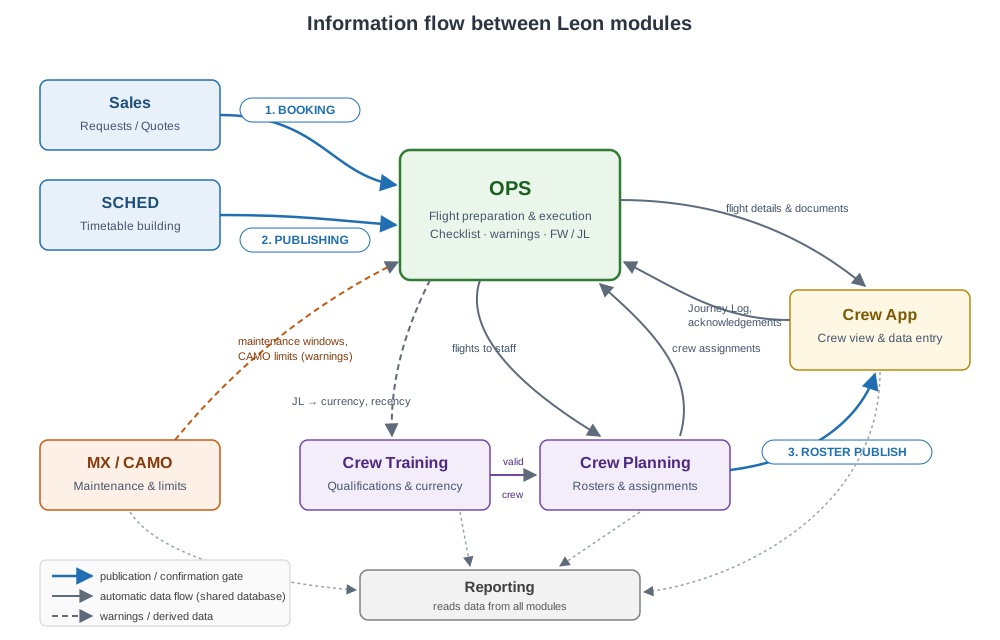
1. Booking a trip (Sales → OPS)
A quote in Requests/Quotes becomes operational the moment it is booked. Booking creates (or confirms) the trip in OPS — from that point, OPS sees it in Table/Calendar/Timeline, the OPS checklist is generated, and Crew Planning sees the flights to be staffed. An Option creates a non-confirmed trip in OPS (visible but tentative, with an optional automatic cancellation due date). The link works in both directions: schedule changes on the booked quote update the trip in OPS, and (depending on settings) trip changes in OPS update the quote. It is also possible to connect a new request to a trip that OPS created first.
2. Publishing the schedule (SCHED → OPS)
Flights built in SCHED remain internal to the schedule until they are published. Only published flights appear in the OPS views and become available for crew assignment; SSIM export and auto-sending to DCS/PSS also apply to published flights only. This lets the scheduling team build and rework an entire season programme without exposing half-finished data to operations.
3. Publishing crew drafts (Crew Planning → crew & OPS)
Crew rosters and assignments can be prepared in draft mode (Manual Publish setting). Draft duties and crew changes are visible to planners but not to the crew — crew members see their duties in the Crew App and calendars only after the roster is published. Publication triggers notifications and, if enabled, roster-change acknowledgements. This gate protects crew from seeing a constantly changing work-in-progress roster and gives planners a controlled release point. (Operators can also work in Auto Publish mode, where every change is live immediately.)
The overall flow
Putting it together, the typical lifecycle of a flight looks like this:
-
Sales books a charter trip, or SCHED publishes a timetable → flights appear in OPS and on the crew planning views.
-
Crew Training data (endorsements, currency, training records) determines which crew members are valid candidates.
-
Crew Planning builds the roster and assigns crew, working in drafts, and publishes it → crew are notified in the Crew App.
-
MX/CAMO constraints (maintenance windows, limits) are checked against the plan the whole time; conflicts show as warnings.
-
OPS prepares and dispatches the flight: works the checklist, resolves every warning raised by the previous steps, monitors the flight via Flight Watch, and closes it with the Journey Log — often filled in by the crew directly in the Crew App.
-
Journey Log data flows back into the system: crew currency and FTL records, aircraft TAH/TAC counters, quote recalculation in Sales — and the whole process becomes visible in Reporting.
OPS sits at the centre of this loop — it is both the consumer of everything the other modules produce and the final safety net for the whole process.
Beyond Leon: integrated products
Not every step of an operator's workflow happens inside Leon. Parts of the process are handled by specialised external systems, connected through Leon's integrations and API:
-
Sales sourcing — requests can arrive from charter marketplaces such as Avinode.
-
Flight planning — routes, fuel calculation, and flight plan filing are typically done in tools like ForeFlight, with schedules and (where supported) flight-plan data exchanged with Leon.
-
Maintenance/CAMO — detailed airworthiness tracking lives in dedicated systems (e.g. CAMP, Veryon Tracking/Flightdocs), which exchange aircraft times and maintenance data with Leon.
-
Training providers — endorsement records can be imported automatically from training platforms (e.g. Scandlearn, Universal Aviation Training).
-
Scheduled-operations systems — published schedules are distributed to DCS/PSS/CMS systems via SSIM.
-
Custom workflows — the Leon GraphQL API allows operators to connect any in-house or third-party tool to the same shared data model.
In these cases Leon remains the operational source of truth for the schedule, crew, and flight data, while the integrated product handles its specialised part of the workflow.