

Universal Aviation Training (UAT) offers a unique and state-of-the-art training system that is a combined product of technology and aviation expertise, all aimed to provide one high-end quality training infrastructure to assist airlines, ATOs and individual pilots with their training demands. The platform enables one to complete courses on an online or offline capability.
How to integrate
In order to integrate with UAT, the Operator has to have an active user in the UAT system.
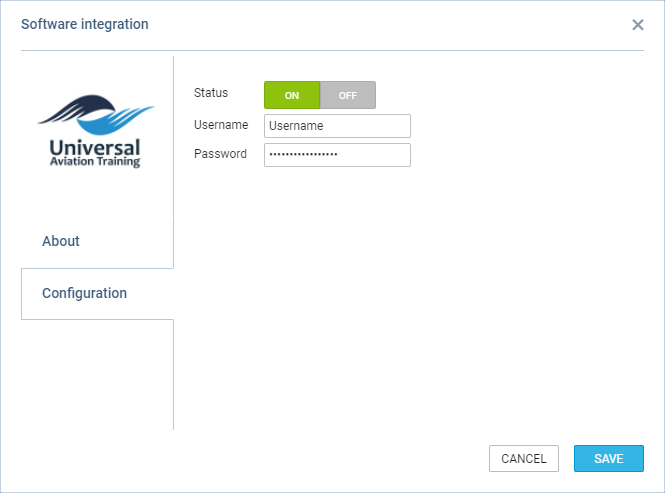
Simply switch the status to ‘ON’ and insert the login details in the Configuration section.
Leon should automatically start downloading the endorsements upon saving the integration credentials.
How it works
The integration allows importing Crew Endorsement from UAT to Leon.
Once the integration is completed, Leon will download the endorsements from UAT. Leon will not replace existing Leon endorsements with the downloaded ones but will create additional records in the endorsements list.
The endorsements from UAT will be indicated with the UAT logo:
-
‘Endorsements definitions’:

-
User profile > ‘Endorsements’ tab:
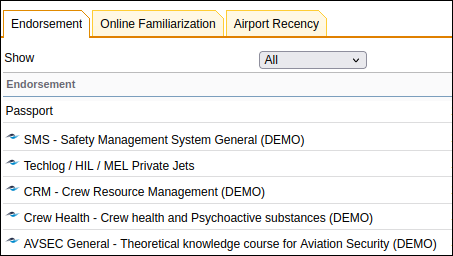
Leon runs a script every 3h checking if there were any changes in UAT:
-
Changes to existing endorsements - any changes to matching endorsements in UAT will update the expiry date of the same endorsement in Leon
-
New endorsement in Scandlearn - if there is a new endorsement added in UAT, Leon will update the relevant User(s) record with the new one
In the Endorsements list as well as in the User profile, UAT endorsements will display below the endorsements added in Leon.
Users are matched by the crew work email address in both systems.
For more information please visit: https://www.e-uat.com/