

Leon allows operators to reassign individual checklist items from one checklist group to another — for example, moving an item from OPS to SALES, or a service item to FLIGHT CARE. This is useful when responsibilities shift between departments without the need to recreate checklist items from scratch.
Accessing the feature
This functionality is available exclusively to Leon Support users. To access it, go to:
General Settings > Checklist
In the checklist configuration table, a gear icon (⚙) appears in the Type column next to each item. This icon is visible only for Leon Support accounts.

Changing the group of a checklist item
-
Open General Settings > Checklist.
-
Find the checklist item you want to reassign.
-
Click the gear icon (⚙) in the Type column next to that item.
-
A modal window will appear with a list of available groups: OPS, SALES, and FLIGHT CARE.
-
Select the target group and confirm.
-
A success message will confirm the change has been saved. If something goes wrong, an error message will be displayed instead.
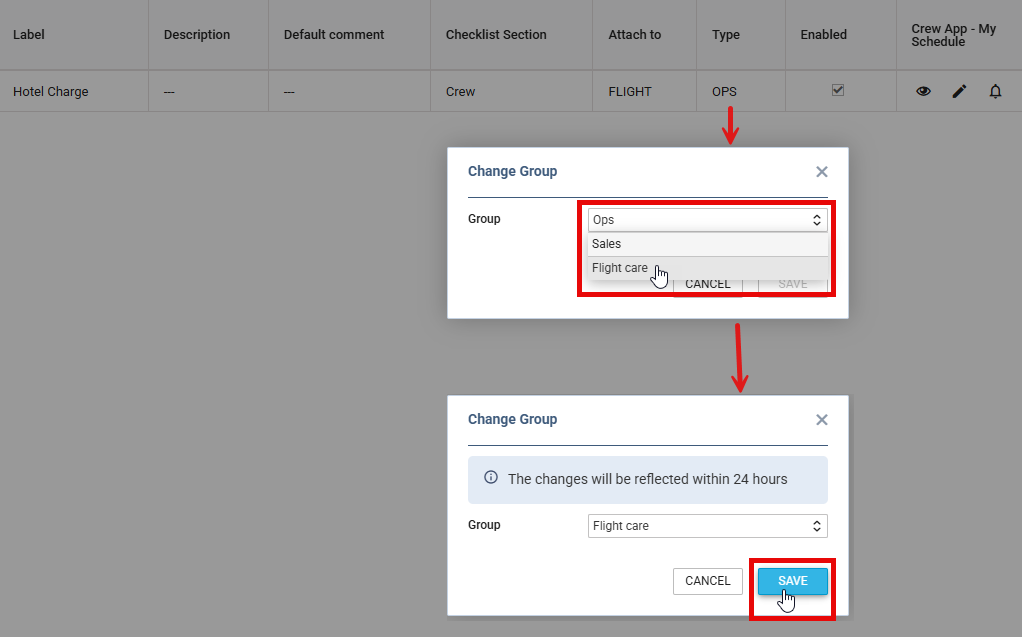
Changes to checklist item groups are reflected in the system within 24 hours. During this time, the dot indicator on the flights list may temporarily appear outdated.
Items that cannot be reassigned
Some checklist items are system-critical and their group cannot be changed. Attempting to edit these will display the message: "Cannot change checklist definition group…"
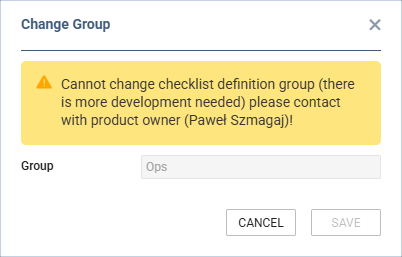
The following items are locked:
|
|