

0. Introduction
The Universal Per Diem template is a single, configurable Twig template that calculates per diem allowances for crew based on their duties and away-from-base periods, with support for multiple rate systems, day-counting methods, currency display, and qualification rules. All operator-specific behavior is controlled by configuration flags — no code changes are needed.
Obtaining the report
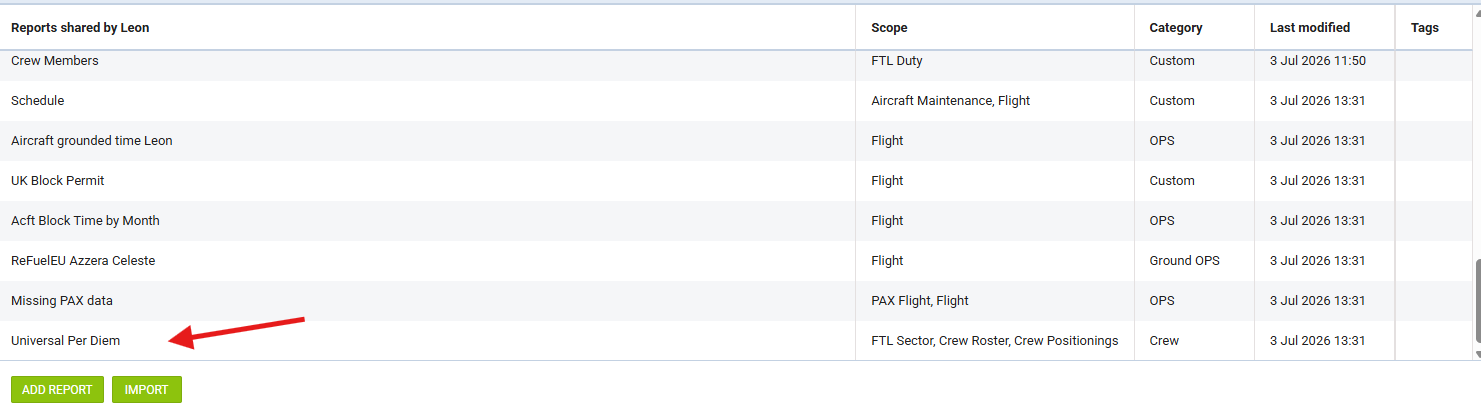
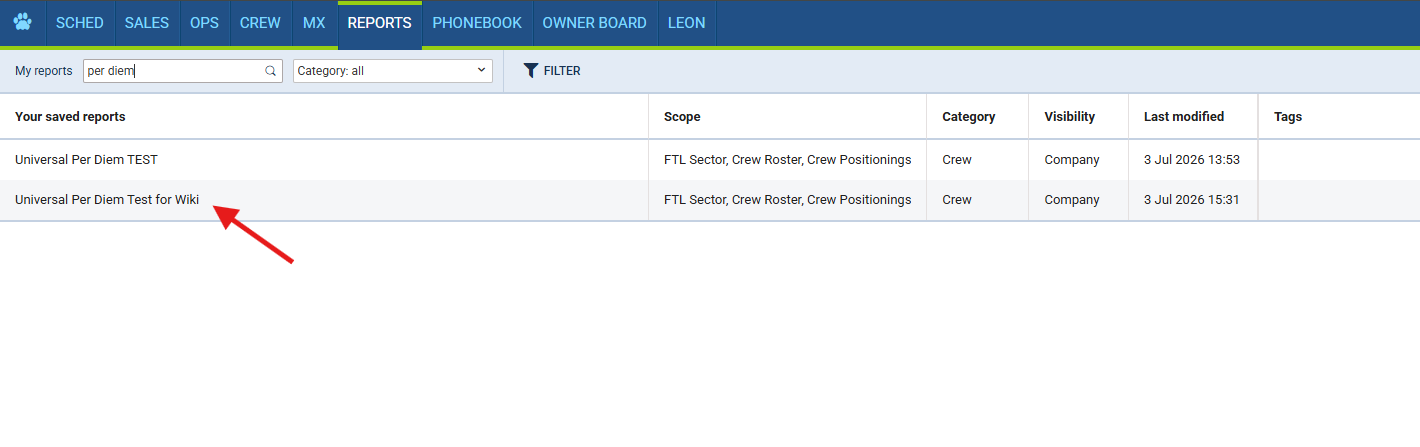
The report is available under reports Shared by Leon - however, this is only a demonstration version, and its' code cannot be modified. To start adapting the code to your company’s needs, you need to copy the report to Your Saved Reports:
-
Enter the report,
-
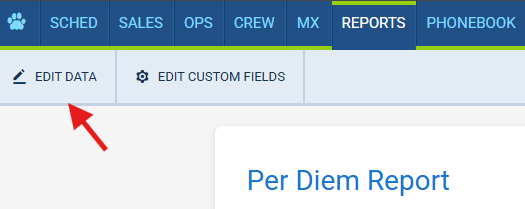
Select Edit Data,
-
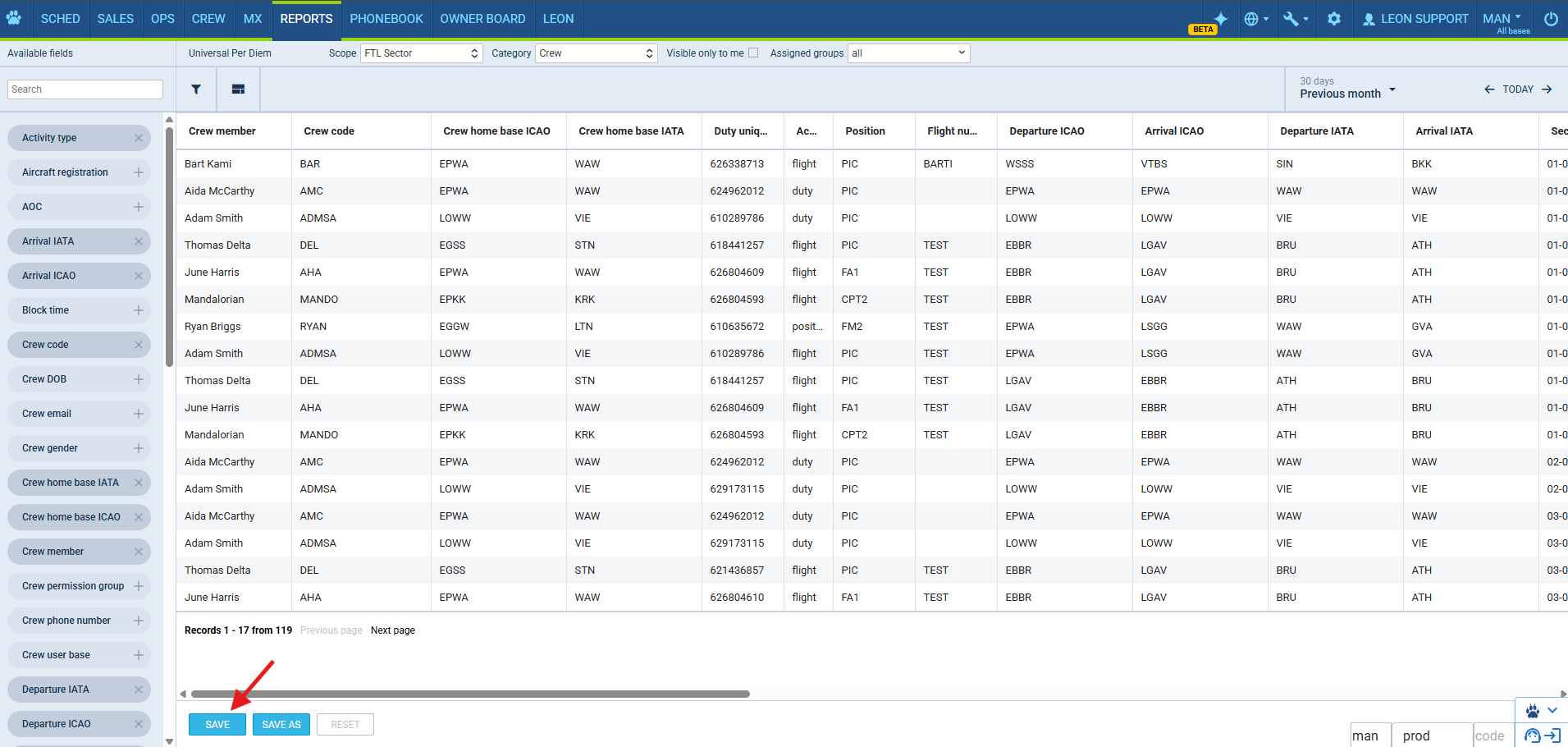
Click Save As,
-
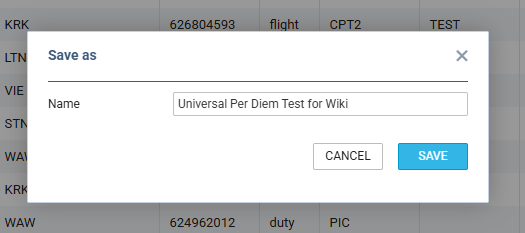
(Optional) Change the name to your own,
-
Save and go to Your Saved Reports to modify the report.
1. How to use this guide
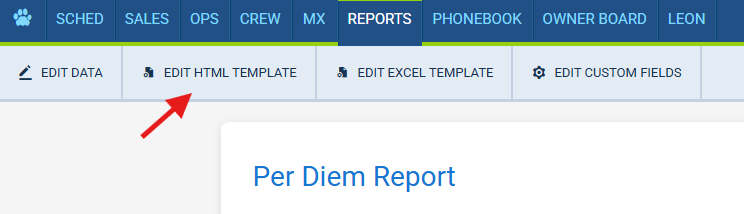
Open BODY in the Leon HTML template editor of the report.
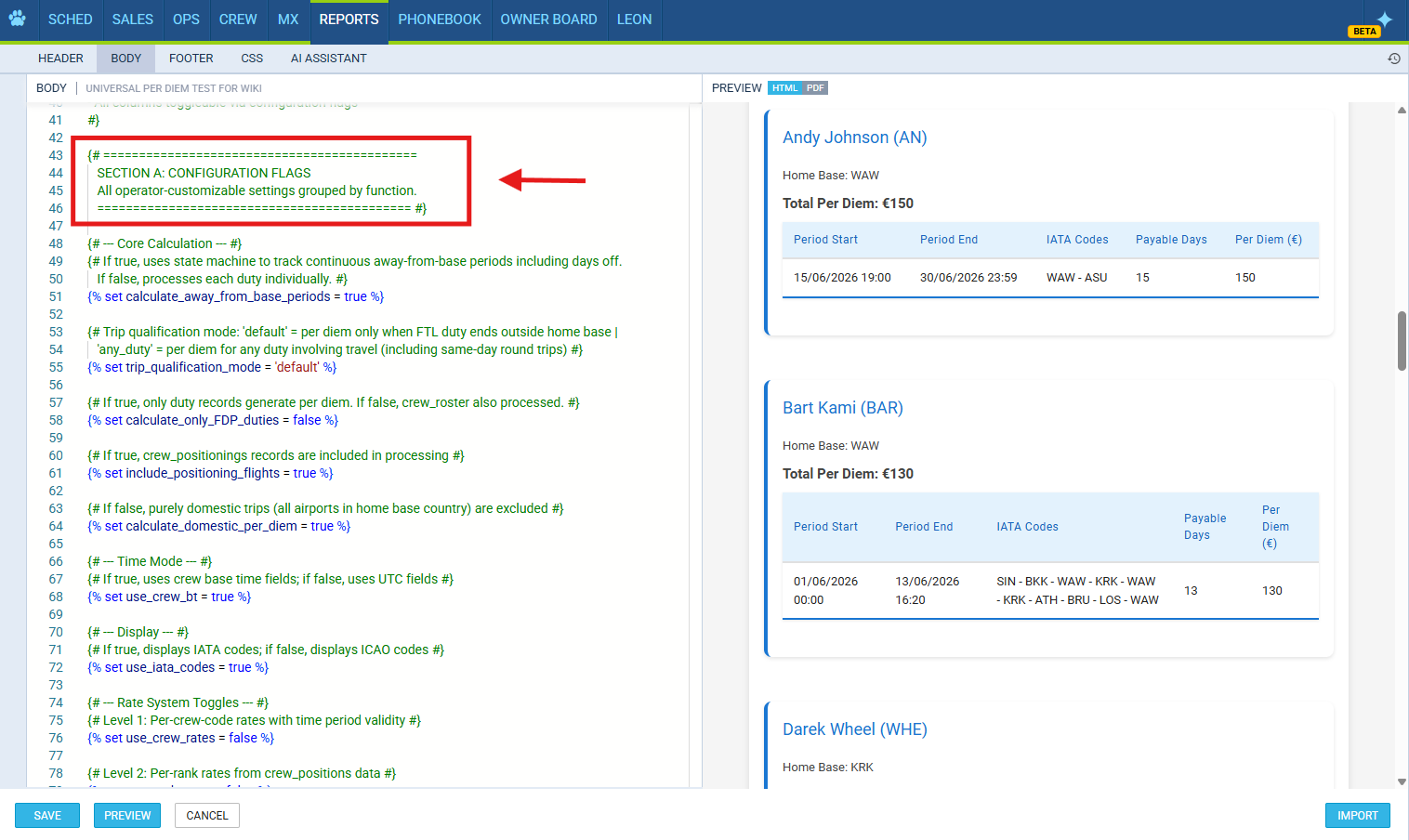
All configuration flags are at the top of the file in Section A (behavior flags) and Section B (rate data). Change values there to configure the template for your needs. Section 2 below explains the one-time data-scope setup; the remaining sections explain every flag.
2. Data Sources and Scope Setup (read first)
The template consumes three Leon data scopes:
|
Scope |
Leon binding |
Role |
|---|---|---|
|
FTL Sector |
|
Provides one row per sector (leg) with duty-level times, crew identification, home base, rank ( |
|
Crew Positionings |
|
Ground-transport positioning (train / car / taxi / commercial) that is not captured as a flight sector. |
|
Crew Roster |
|
Off, standby, training, and office days. |
Things to know about the data:
-
Crew Positionings links to its duty via
duty_unique_id. Ground-transport positioning legs are merged back into the duty route using this identifier. -
Ground-transport positioning is not a flight sector. Those legs come only from the Crew Positionings scope and are merged into the duty route. Do not remove the Crew Positionings scope or ground positioning legs (and ground-only positioning duties) will be missing from routes.
-
No-flight duties (office, ground duty) appear in FTL Sector as
activity_type = 'duty'rows and generate no per diem when at home base. -
Crew rank comes from the FTL Sector
positionfield. Observed values includeCPT,FO,CC1,LTC,CPT2,FO-T,JMP. Use these exact codes inrank_ratesandcrew_positionsif rank rates are enabled.
3. Core Calculation Settings
|
Flag |
Type |
Default |
Description |
|---|---|---|---|
|
|
boolean |
|
Continuous trip tracking vs. individual duty. When |
|
|
boolean |
|
FTL-only vs. FTL + roster duties. When |
|
|
boolean |
|
Whether positioning (deadhead) counts. When |
|
|
boolean |
|
Domestic trip handling. When |
|
|
string |
|
Trip qualification logic. When |
4. Time and Display
|
Flag |
Type |
Default |
Description |
|---|---|---|---|
|
|
boolean |
|
Crew base time vs. UTC. When |
|
|
boolean |
|
Airport code format. When |
Note on crew base time: the Crew Roster scope has no base-time fields, so the template infers each crew member's UTC-to-base-time offset from their FTL Sector duty records and applies it to roster timestamps.
5. Rate System (3-Level Cascade)
The template uses a cascading rate system to determine the per diem rate for each crew member. Rates are evaluated in order of priority — the first matching level wins:
-
Level 1 — Crew rates (
use_crew_rates): Per-person rates with date-based validity periods. Highest priority. -
Level 2 — Rank rates (
use_rank_rates): Rates based on crew rank/position (from the FTL Sectorpositionfield). -
Level 3 — Location rates (
use_two_pass_rates): Rates based on where the crew member is (airport or country). Uses a two-pass calculation where each calendar day gets its own location-based rate.
If no level matches, the default_rate is used as a final fallback.
Toggle Flags
|
Flag |
Type |
Default |
Description |
|---|---|---|---|
|
|
boolean |
|
Enable Level 1 (crew-specific rates). When |
|
|
boolean |
|
Enable Level 2 (rank-based rates). When |
|
|
boolean |
|
Enable Level 3 (location-based rates). When |
Rate Data Hashes
crew_rates — Level 1: Per-Crew Rates
-
Type: Hash (object)
-
Default:
{}(empty — no crew-specific rates) -
Format: Each key is a crew code, each value is an array of rate periods.
-
When to use: When individual crew members have personal per diem rates, especially with date-based validity.
Example:
'JSmith': [
    {'rate': 75.0, 'currency': 'usd', 'start_date': '01-01-2025', 'end_date': '30-06-2025'},
    {'rate': 80.0, 'currency': 'usd', 'start_date': '01-07-2025', 'end_date': null}
]
-
start_date/end_dateuse DD-MM-YYYY format. Setend_datetonullfor an open-ended rate. -
Multiple periods allow tracking historical rate changes.
rank_rates — Level 2: Per-Rank Rates
-
Type: Hash (object)
-
Default:
{}(empty — no rank-based rates) -
Format: Each key is a rank code (FTL Sector
positionvalue), each value hasrateandcurrency. -
When to use: When per diem varies by crew position (Captain vs. FO vs. Cabin Crew).
Example:
'CPT': {'rate': 80.0, 'currency': 'eur'},
'FO':  {'rate': 65.0, 'currency': 'eur'},
'CC1': {'rate': 50.0, 'currency': 'eur'}
crew_positions — Rank Hierarchy
-
Type: Hash (object)
-
Default:
{}(empty) -
Format: Each key is a rank code, each value is a priority number (higher = higher priority).
-
When to use: When using rank rates and a crew member might appear with different positions across sectors in the same period. The highest-priority rank is used for rate lookup.
Example:
'CPT': 4,
'LTC': 3,
'FO':  2,
'CC1': 1
airport_rates — Level 3: Airport-Specific Rates
-
Type: Hash (object)
-
Default:
{}(empty — no airport-specific rates) -
Format: Each key is an ICAO airport code, each value has
rateandcurrency. Optionally addtiersfortieredmode. -
When to use: When specific airports have special per diem rates (e.g., expensive cities).
Example:
'KJFK': {'rate': 100.0, 'currency': 'usd'},
'RJTT': {'rate': 120.0, 'currency': 'usd', 'tiers': {'full': 120, 'half': 75}}
-
Airport rates have highest priority within Level 3.
country_rates — Level 3: Country Rates
-
Type: Hash (object)
-
Default:
{}(empty — no country-specific rates) -
Format: Each key is a 2-character ICAO country prefix, each value has
rateandcurrency. Optionally addtiersfortieredmode. -
When to use: When per diem varies by destination country but not by specific airport.
Example:
'EG': {'rate': 70.0, 'currency': 'gbp'},
'LF': {'rate': 65.0, 'currency': 'eur'},
'EP': {'rate': 100.0, 'currency': 'eur', 'tiers': {'full': 100, 'half': 62}}
-
Country rates are used when no airport-specific rate matches. Common prefixes: EG=UK, LF=France, ED=Germany, ES=Sweden, EK=Denmark, EP=Poland, LE=Spain, LI=Italy.
default_rate — Final Fallback
-
Type: Object
-
Default:
{'rate': 10.0, 'currency': 'eur'} -
When to use: Always set this. It is the fallback when no crew, rank, airport, or country rate matches. Optionally add
tiersfortieredmode. -
Tip: Set
rateto0.0if the operator should pay nothing by default (only specific locations/ranks get per diem).
6. Day Counting
day_counting_mode
-
Type: String
-
Default:
'full' -
What it does: Controls how away days are converted into payable per diem units.
|
Mode |
Behavior |
Use when... |
|---|---|---|
|
|
Each calendar day the crew is away counts as 1 full day. |
You pay a flat daily rate regardless of hours. |
|
|
Days are counted as fractions based on hours away that calendar day. The thresholds in |
You pay different amounts based on how many hours the crew is away (e.g., 25% for 1-5h, 50% for 6-11h, 100% for 12h+). |
|
|
A departure before the window start hour or an arrival after the window end hour adds an extra half-day. |
You use a specific time window (e.g., 12:00-19:00) to determine if an extra half-day is owed on departure/arrival days. |
|
|
Same hour-based thresholds as |
You use exact amounts per tier (e.g., "Poland: full day = 100 EUR, half day = 62 EUR") rather than calculating fractions of a single rate. |
Incremental and Tiered Mode Settings
|
Flag |
Type |
Default |
Description |
|---|---|---|---|
|
|
Array of objects |
|
Hour brackets for |
Example interpretation of the default: If crew is away 12+ hours on a day, full tier / fraction 1.0. 6-11 hours, half tier / fraction 0.5. 1-5 hours, quarter tier / fraction 0.25.
Tiered Mode — Rate Configuration
When day_counting_mode is 'tiered', rate objects (airport_rates, country_rates, default_rate, crew_rates, rank_rates) support an optional tiers sub-object that maps tier names to fixed amounts. The tier names must match the tier keys in incremental_thresholds.
Example — country rate with tiers:
'EP': {'rate': 100, 'currency': 'eur', 'tiers': {'full': 100, 'half': 62, 'quarter': 30}}
In this example, a full day in Poland pays exactly 100 EUR, a half day pays 62 EUR, and a quarter day pays 30 EUR - regardless of the fraction values in the thresholds.
Fallback behavior: If a rate object has no tiers sub-object (or the matched tier key is missing), the template falls back to fraction x rate - the same calculation as incremental mode. You can mix tiered and non-tiered rates: locations with tiers use fixed amounts, locations without use fraction-based calculation.
Currency conversion still applies - tier amounts are defined in the rate object's currency and converted to the display currency automatically.
Half-Day Window Settings
|
Flag |
Type |
Default |
Description |
|---|---|---|---|
|
|
Integer |
|
The start of the half-day window (hour of day, 24h format). A departure before this hour on the first day of a trip adds a half-day bonus. |
|
|
Integer |
|
The end of the half-day window (hour of day, 24h format). An arrival after this hour on the last day of a trip adds a half-day bonus. |
Final Day Handling
|
Flag |
Type |
Default |
Description |
|---|---|---|---|
|
|
boolean |
|
When |
7. Qualification and Filtering
These flags control which duties qualify for per diem and what conditions must be met.
SIM Exclusion
|
Flag |
Type |
Default |
Description |
|---|---|---|---|
|
|
boolean |
|
When |
Overnight Qualification
|
Flag |
Type |
Default |
Description |
|---|---|---|---|
|
|
boolean |
|
When |
|
|
Integer |
|
Minimum rest hours at the destination to count as a qualified overnight stop. Only applies when |
|
|
Integer |
|
The earliest departure hour (24h format) that qualifies - departures before this hour on the next day may not count as a proper overnight. Only applies when |
Duty Type Filtering
|
Flag |
Type |
Default |
Description |
|---|---|---|---|
|
|
Array of strings |
|
Which roster duty types are processed for per diem. Only roster records with a |
|
|
Array of strings |
|
Further filter roster records by specific duty names. When empty, all duties matching |
|
|
Array of strings |
|
Roster duty names that cancel per diem even during an active away-from-base period. If the crew is away and a duty with one of these names appears, that day is not paid. Use for unpaid leave or certain standby types the operator excludes. |
Travel Requirement
|
Flag |
Type |
Default |
Description |
|---|---|---|---|
|
|
boolean |
|
When |
8. Report Boundary Handling
These flags handle edge cases at the start and end of the reporting period, when the crew's actual trip may extend beyond the report dates.
|
Flag |
Type |
Default |
Description |
|---|---|---|---|
|
|
boolean |
|
When |
|
|
boolean |
|
When |
Typical usage: Leave both true for accurate per diem across month boundaries (a crew member on a multi-day trip spanning two months is correctly counted in both). Set both to false only if the operator strictly limits per diem to duties fully within the report window.
9. Currency
Display Currency
Enable exactly one of these flags to set which currency the report displays:
|
Flag |
Type |
Default |
Description |
|---|---|---|---|
|
|
boolean |
|
Display all amounts in US Dollars. |
|
|
boolean |
|
Display all amounts in British Pounds. |
|
|
boolean |
|
Display all amounts in Euros. |
|
|
boolean |
|
Display all amounts in Swedish Kronor. |
Important: Set only one to true. The template converts all rates to the selected display currency using the exchange rates below. (Default display currency is EUR.)
Exchange Rates
|
Flag |
Type |
Default |
Description |
|---|---|---|---|
|
|
Hash (object) |
|
Conversion rates with EUR as the base (EUR is always 1.0). To update: set each currency's value to how many units of that currency equal 1 EUR. Update regularly for accurate cross-currency conversion. |
Currency Symbols
|
Flag |
Type |
Default |
Description |
|---|---|---|---|
|
|
Hash (object) |
|
Display symbols shown next to amounts. Only change if the operator prefers alternate formatting (e.g., |
If you want another currency to be added to the report, let us know through Customer Portal ticket.
10. Presentation
|
Flag |
Type |
Default |
Description |
|---|---|---|---|
|
|
boolean |
|
When |
|
|
boolean |
|
When |
|
|
boolean |
|
When |
|
|
boolean |
|
When |
11. Airport Discontinuity Warnings
The template automatically flags airport discontinuities — a duty that starts away from home base with no preceding trip that brought the crew there. These appear as:
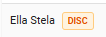
-
DISC badge — an orange label next to the affected crew member in summary,
-
Orange-highlighted rows — the affected period row is visually highlighted, with a note
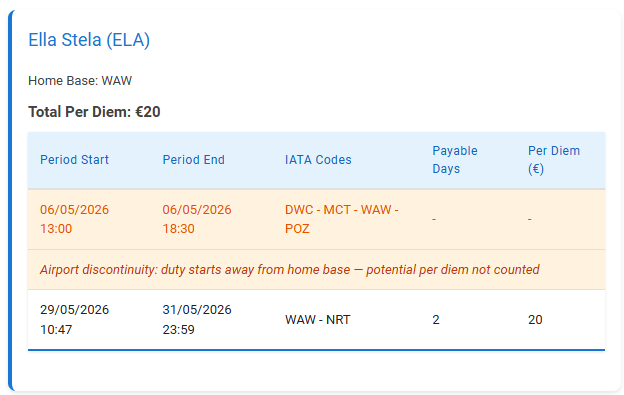
When they appear: Typically when a positioning leg that would have carried the crew to that airport is missing. The most common cause is ground-transport positioning that is not linked to its duty, so the route appears to start away from base. Other causes: a missing or unrecorded positioning, ground travel between airports, or a data entry error in Leon.
No configuration needed — discontinuity warnings are always active. They are informational only and do not affect per diem totals. Use them to spot data-quality issues and to confirm Crew Positionings linkage is healthy.
Quick Reference — All Flags
|
# |
Flag |
Type |
Default |
|---|---|---|---|
|
1 |
|
boolean |
|
|
2 |
|
boolean |
|
|
3 |
|
boolean |
|
|
4 |
|
boolean |
|
|
5 |
|
string |
|
|
6 |
|
boolean |
|
|
7 |
|
boolean |
|
|
8 |
|
boolean |
|
|
9 |
|
boolean |
|
|
10 |
|
boolean |
|
|
11 |
|
string |
|
|
12 |
|
array |
|
|
13 |
|
integer |
|
|
14 |
|
integer |
|
|
15 |
|
boolean |
|
|
16 |
|
boolean |
|
|
17 |
|
boolean |
|
|
18 |
|
integer |
|
|
19 |
|
integer |
|
|
20 |
|
array |
|
|
21 |
|
array |
|
|
22 |
|
array |
|
|
23 |
|
boolean |
|
|
24 |
|
boolean |
|
|
25 |
|
boolean |
|
|
26 |
|
boolean |
|
|
27 |
|
boolean |
|
|
28 |
|
boolean |
|
|
29 |
|
boolean |
|
|
30 |
|
hash |
|
|
31 |
|
hash |
|
|
32 |
|
boolean |
|
|
33 |
|
boolean |
|
|
34 |
|
boolean |
|
|
35 |
|
boolean |
|
|
36 |
|
hash |
|
|
37 |
|
hash |
|
|
38 |
|
hash |
|
|
39 |
|
hash |
|
|
40 |
|
hash |
|
|
41 |
|
object |
|