

AeroCRS is a cloud-based system for managing and operating a small/medium airline scheduled or charter-based operation. For more information please visit Official Website.
How to integrate
If you already are an AeroCRS client, you simply need to contact mailto:support@aerocrs.com to receive details for integration with Leon.
In this section, you can set up the integration with AeroCRS by switching it to Active. Once activated, insert integration details and press SAVE. This completes the process and you can start importing flights from AeroCRS into Leon.
How to import flights
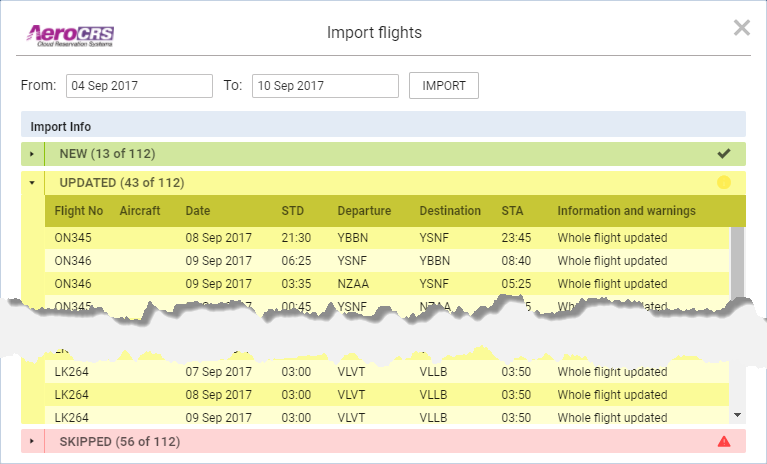
Once it is active, you can start importing flights from AeroCRS.
Go to OPS section where you will see the actions button 
When you click on ‘AeroCRS’ link Leon will open the Import Window where you can choose the timeframe. Timeframe is limited to 7 days.
After clicking on ‘IMPORT’ button Leon will display flights divided into 3 sections:
-
New - flights just imported for the first time
-
Updated - any updates made to previously downloaded flight. These could be changes made both in Aero CRS and Leon. If the schedule changes are made in Leon, AeroCRS will overwrite it upon the next import.
-
Skipped - flights ignored during import due to a number of reasons such as: missing IATA code or number, unrecognized airport, etc.
Once the Import window is closed, the OPS section in Leon will update with the imported flights.
AeroCRS is IATA-based software, please make sure your Fleet has IATA codes inserted. If an aircraft registered in AeroCRS is missing in Leon, the flights will not be imported.