

Leon Marketplace allows flights to be sold and purchased within Leon.
How to integrate
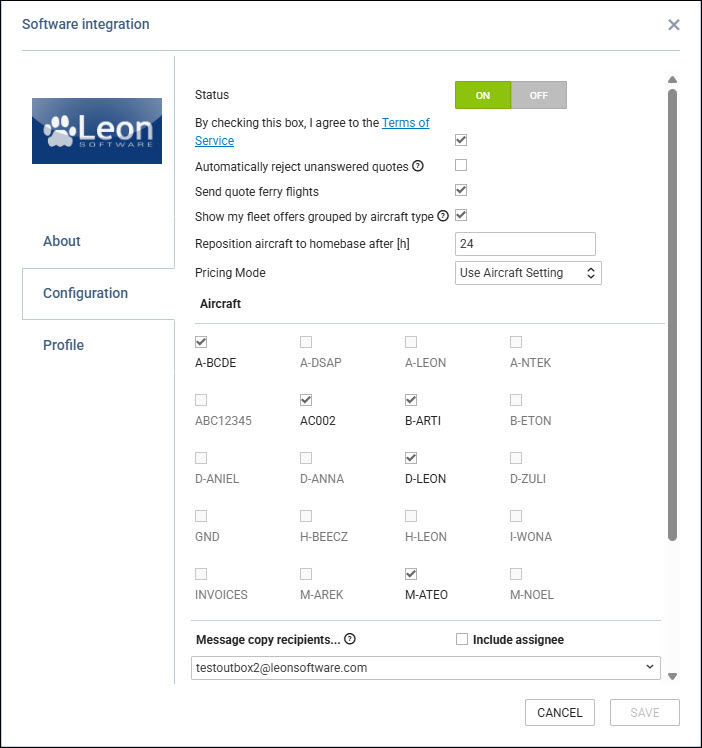
To integrate with Leon Marketplace, switch the integration to ON in the the Configuration Panel and select any of the additional options:
-
Automatically reject unanswered quotes - accepting requests in Leon will automatically reject unanswered quotes in Marketplace
-
Send quote ferry flights - depending on the setting, ferry legs are sent (ticked) or not sent (unticked) to Marketplace when accepting the quote from Leon
-
Show my fleet offers grouped by aircraft type - This feature is ideal when the Operator would like to promote an aircraft type rather than a specific tail number:
-
In Leon Marketplace - Clients will see the lowest available price for the aircraft type, along with the corresponding aircraft registration.
-
In the Leon Sales Panel - Once a client submits a quote request, quotes will be automatically generated for the registrations of the lowest-priced aircraft of each selected type. During the quoting process, you can manually offer a different aircraft if it is more suitable.
-
-
Reposition aircraft to homebase after [h] - value inserted in this field indicates after how many hours the aircraft will be visible at Home Base
-
Pricing Mode - based on this setting, the search for available aircraft works as follows:
-
Fixed base – the distance ratio is calculated relative to the aircraft’s base.
-
Floating base – the distance ratio is calculated relative to the last known location with respect to the ADEP of the first RFQ leg.
-
Use Aircraft Setting – this is a default setting and applies the aircraft’s own setting.
This setting does not affect positioning generation or pricing. For the Floating base defined in the aircraft settings, the hour values entered there do not matter.
-
-
Aircraft - selection of aircraft included in the Marketplace
-
Dimmed registration indicates that no default Aircraft/Airport Fees were connected to the aircraft in the Fleet setup
-
-
Message copy recipients - Select internal email addresses to receive copies of all messages sent and received to and from buyers and operators from the sales module. Only mailboxes previously added to the system can be used.
-
Include assignee - possibility to include the request assignee in the message recipients list
-
-
Buyer list - configuration of the list of buyers that can see your operator aircraft. It gives a possibility to include all the buyers (ALL), certain selected buyers (ALLOW), or exclude selected buyers (DENY) from the requester list
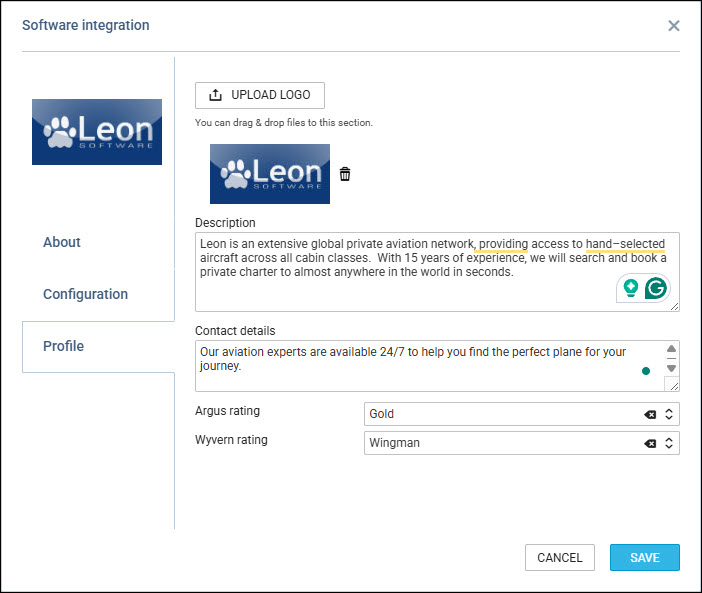
Additionally, the Operator/Broker can insert additional information which will be visible when a Client requests a trip in the Profile tab
It allows inserting the following information
-
Upload logo option - possibility to upload the logo
-
Description - text field that allows inserting more information about the Operator/Broker
-
Contact details - text field that allows inserting contact details
-
Argus rating - is a safety rating system for business aviation operators (charter/private aviation). It is widely used in the U.S. and internationally by brokers, charter companies, and corporate clients to assess the safety level of an operator. The dropdown with the following options:
-
Registered - the operator is listed in the ARGUS database
-
Gold - the operator meets enhanced safety criteria
-
Gold Plus
-
Platinum - the highest level, granted after a comprehensive operational safety audit
-
Platinum Elite - indicates maintaining the highest rating for multiple consecutive years
-
-
Wyvern rating - Similar program to ARGUS. The program helps determine whether an operator operates safely and in accordance with industry best practices. The dropdown with the following options:
-
Registered - the operator is listed in the WYVERN system database
-
Wingman - the operator has successfully completed a comprehensive safety audit conducted by WYVERN
-
Wingman Pro - a higher-level program focused on continuous safety monitoring and advanced operational standards
-
How it works
It allows Leon Clients to search for flights and empty legs within Leon Clients who have also activated Leon Marketplace.
The process is explained here.