

ForeFlight Dispatch is a powerful new component of ForeFlight Web that delivers next-generation, multi-user, “schedule-to-mobile” flight planning, resulting in greater efficiency and productivity for flight departments of any size. It keeps the entire operation in sync and running smoothly by providing a centralised list of all planned and filed flights that are visible to everyone.
Dispatch integrates crew assignment and mobile flight releases into its flight planning workflow, allowing planners to release flight plans directly to assigned crew members’ iPads and iPhones before departure.
In addition, planners can get a better insight into the status of any flight and an overall view of the day’s operations, while pilots can easily see flights assigned to them both on the web and on their mobile devices.
What you can do with this integration
-
Automatically send scheduled flights from Leon to ForeFlight Dispatch, so pilots see releases on their iPad/iPhone before departure.
-
Choose between ForeFlight API v1 and v2 per integration, and run multiple ForeFlight accounts from one Leon account using the 'Display name' field.
-
Control exactly which trip statuses trigger a send, and how many days ahead flights are pushed.
-
Include the flight number and passenger/cargo data in the information sent to ForeFlight.
-
Pull fuel figures back from ForeFlight into the 'Fuel' OPS checklist item, and optionally flag the checklist item for review when this happens.
-
Pull the aircraft's actual take-off weight, zero-fuel weight and actual landing weight from ForeFlight into the Journey Log — used as default values when a new Journey Log is created for the flight.
-
Automatically accept or flag flight time changes made in ForeFlight, with an optional threshold in minutes.
-
Download flight distance from ForeFlight when enabled.
-
Send individual documents or a batch of marked documents (e.g. GenDec, trip sheet, manifests) straight to ForeFlight's CrewBriefing from OPS or Sales, without leaving Leon.
How to integrate
To integrate, you have to have an active account with ForeFlight
In ForeFlight, you need to generate an API key that allows integrators to access the customers’ accounts.
The format of the API key is a string, e.g.
FS1+nO1EJH3sx2OQEAU1QxT10Wk8RU9tb7W+j7H4/oY=
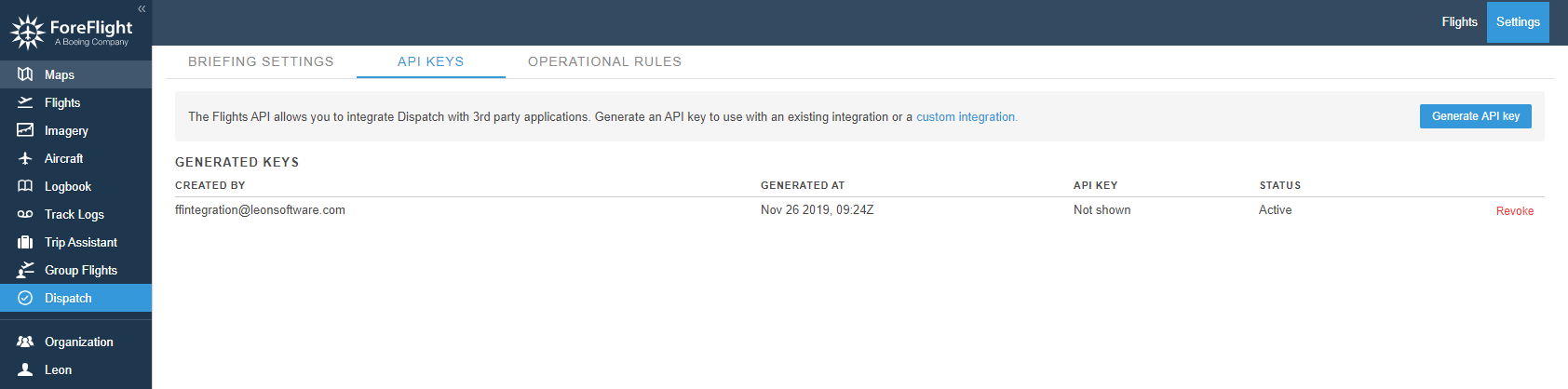
To generate API key you need to:
-
Log in to your ForeFlight account
-
Go to 'Dispatch' section within your ForeFlight account
-
Click the “Generate API key” button in the top right-hand corner to generate a new API key
IMPORTANT!!! After generating a key make sure to save it. Keys are not shown again and cannot be retrieved once generated.
All the instructions on how to generate the API key in ForeFlight are explained here
The next step is to go to Add-ons section in Leon. In the ‘Configuration’ tab of ForeFlight integration, you need to switch the status to ‘ON’
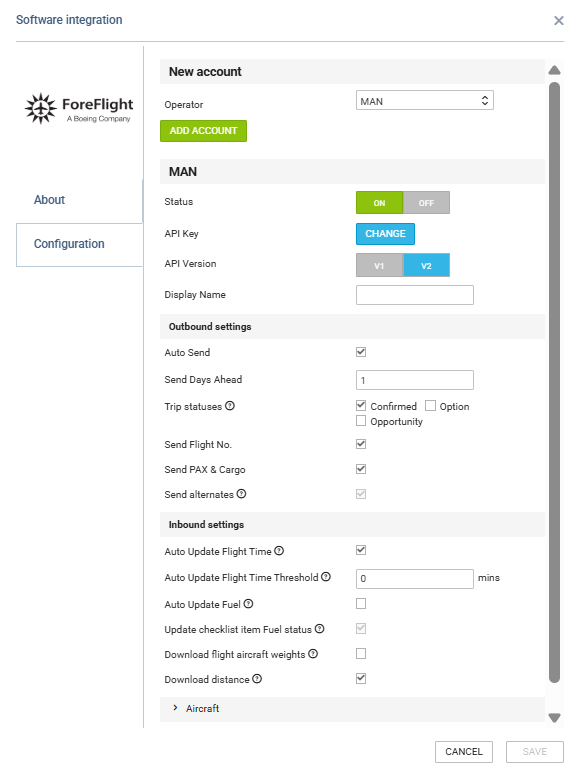
Configuration settings
|
Setting |
What it does |
|---|---|
|
Status (ON/OFF) |
Enables or disables the integration. |
|
API Version |
Chooses API v1 or v2; changes which of the settings below actually take effect. |
|
Display name |
Distinguishes multiple ForeFlight integrations on one Leon account. |
|
Auto-send |
Sends flights automatically instead of requiring a manual send. |
|
Send Days Ahead |
Defines how many days of the schedule are sent ahead to ForeFlight (max. 30). |
|
Trip statuses |
Defines which trip statuses are eligible to be sent; only relevant when 'Auto-send' is enabled. |
|
Send Flight No |
Includes the flight number in the data sent to ForeFlight. |
|
Send PAX & Cargo |
Controls whether passenger and cargo data are included in updates sent from Leon to ForeFlight. |
|
Send alternates |
Sends ALTN/ALTN2 to ForeFlight — API v1 only; has no effect on API v2. |
|
Auto Update Flight Time |
Allows Leon to receive flight time changes made in ForeFlight. |
|
Auto Update Flight Time Threshold (mins) |
Defines the time-difference threshold, in minutes, used when processing automatic flight time updates from ForeFlight. |
|
Auto Update Fuel |
Downloads fuel values from ForeFlight into the 'Fuel' checklist item. |
|
Update checklist item Fuel status |
Marks the 'FUEL' checklist item for review when fuel is updated from ForeFlight. |
|
Download flight aircraft weights |
Pulls actual take-off weight, zero-fuel weight and actual landing weight into new Journey Logs. |
|
Download distance |
Downloads the flight distance from ForeFlight into Leon when enabled. |
|
Aircraft |
Expandable section used to configure aircraft mapping for the ForeFlight integration. |
Data exchanged between Leon and ForeFlight
Leon → ForeFlight
|
Data |
When it is sent |
Notes |
|---|---|---|
|
Flight schedule (flight no., registration, STD/STA, ADEP/ADES, flight type, status) |
Every 5 minutes for flights within the configured 'Send Days Ahead' window; immediately on save if 'Auto-send' is off. |
Deleted flights in Leon are marked as deleted in ForeFlight. |
|
Passenger and cargo data |
Same schedule as the flight schedule, only when 'Send PAX & Cargo' is enabled. |
Passenger data includes the passenger count and, where the passenger list uses named contacts, the male/female/child/infant breakdown. If passengers are entered as a plain number rather than named contacts, only the total count is sent, even on API v2. |
|
Block fuel |
Same schedule as the flight schedule. |
— |
|
Crew |
Same schedule; re-sent whenever the crew list on the flight changes. |
See crew matching rules below. |
|
Alternate airports (ALTN, ALTN2) |
Same schedule, only when 'Send alternates' is enabled. |
Available on API v1 only. On API v2 this setting has no effect, even if switched on. |
|
Documents (GenDec, trip sheet, manifests, etc.) |
On demand, from the OPS or Sales document menu. |
Single document or marked batch. |
ForeFlight → Leon
|
Data |
When it is received |
Notes |
|---|---|---|
|
Fuel figures |
Webhook, when fuel values are updated in ForeFlight. |
Requires 'Auto Update Fuel'; can also flag the 'FUEL' checklist item. |
|
Flight time |
Webhook, when the flight time changes in ForeFlight. |
Requires 'Auto Update Flight Time'. The 'Auto Update Flight Time Threshold (mins)' setting defines the threshold used for automatic processing. |
|
Actual take-off weight, zero-fuel weight, actual landing weight |
Webhook, when the flight is released in ForeFlight. |
Requires 'Download flight aircraft weights'; populates the Journey Log only when it is created, not on an existing one. |
|
Flight distance |
Webhook/import from ForeFlight when distance data is available. |
Requires 'Download distance'. |
Leon does not download the flight schedule itself from ForeFlight, and does not import flight distance or manually-entered alternate airports from ForeFlight.
Crew and aircraft matching
Crew are matched in ForeFlight first by crew code, then by work email address. Positions PIC, SIC and CA (Leon's FA1) are sent as such; every other crew position is sent as 'Other'. If a crew member cannot be matched in ForeFlight, they are silently left off the flight — the flight is still sent, without a warning in Leon.
Aircraft are matched by registration, with hyphens removed.
Limitations
-
On API v2, alternate airports (ALTN, ALTN2) are not sent to ForeFlight, even with 'Send alternates' switched on — this setting only works on API v1.
-
Flight distance calculated in ForeFlight is not imported into Leon.
-
Alternate airports set manually in ForeFlight are not imported back into Leon.
-
There is no setting to exclude passenger or cargo data from automatic updates sent to ForeFlight; an update either sends the full flight or none of it. Operators who calculate these values in a separate system need to disable 'Auto-send' altogether to avoid Leon overwriting them.
-
Leon does not download the flight schedule from ForeFlight.
For more information and technical guidance, visit their website: https://foreflight.com/