

CAMP Maintenance is the industry’s leading Aircraft Maintenance and Regulatory Compliance Management solution.
How to integrate
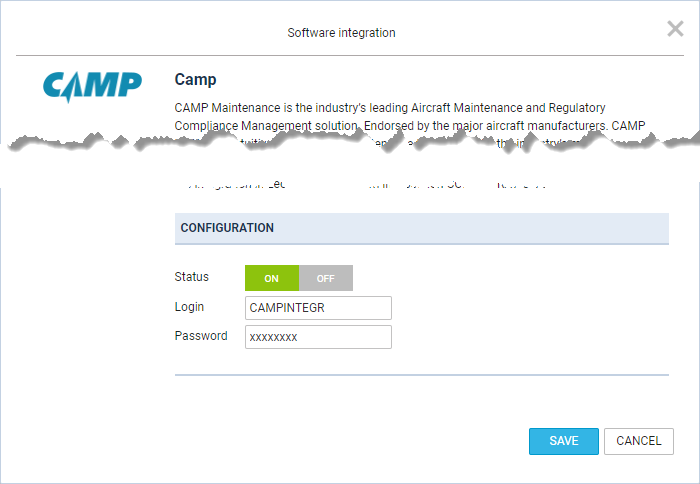
In order to activate the integration, you need to contact support@campsystems.com and request User Name and Password for integration with Leon. The integration login details are not the same ones you use to log in to CAMP. Once you have this information, you can switch the Status to ‘ON’ and insert it in the CAMP integration section (Login and Password). The integration will activate upon saving it.
You can always change the password received from CAMP by clicking on ‘CONFIGURE’ and then the ‘CHANGE’ button.
In the integration configuration, below the Login and Password fields, there is a Send closed Journey logs only checkbox. It is unticked by default, which means Leon sends data from all Journey Logs. Tick it to have Leon send data only from Journey Logs with the status Closed.
How it works
The integration offers automatic TAH, TAC updates for all engines and APU.
Leon exports aircraft TAH & TAC (Total Aircraft Hours & Cycles) as well as APU hours (if updated in the Journey Log in Leon). CAMP integration works one way only from Leon to CAMP.
To make the integration work properly, you need to insert the Aircraft serial number in Settings > Fleet. Integration will check the aircraft serial number and registration.
Then, set up the airframe & engine details in a section MX > Fleet. Click on a selected aircraft and enter the tab CAM. Here, select Airframe ‘start date’ and insert TAH & TAC values. You can do the same for engines. You can also add separate data for ‘APU’ (Aircraft Power Unit), but it does not get automatically increased from the Journey Log entries (like engines) - this is a cumulative value, not hours per single flight. These are the values for the beginning of the day.