

MRX to Leon is a service that automatically fills Leon’s journeyLogs with data taken from BlueEye’s TechLogs when it finds a matching flight. Thanks to this service, you don’t need to write flight information twice in two different softwares anymore.
How does it work?
The service runs every 2 hours and takes only the techlogs of the past 10 days that were not yet sent to Leon. With this data, it will check in Leon for matching flights according to:
-
• Aircraft’s registration,
-
• Departure airport
-
• Destination airports
-
• Take-off time
-
• Landing time
Once it finds the right flight in Leon, it will update the journey log with data taken from BlueEye’s techLog.
What data is sent?
The service takes data from BlueEye and converts it to match Leon’s needs. It sends the following data: 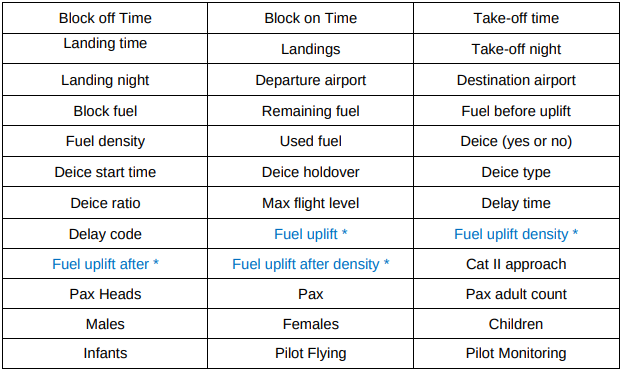
How to integrate? Contact MRX Systems’ Support Team (support@mrxsys.com) to enable the Blue EYE to Leon connection in your account.