

The integration with World Kinect Corporation (formerly known as World Fuel Services) allows to pull
fuel prices from the WKC using the API, with no need to upload CSV/XLS files with fuel prices toof them to specific aircraft and ICAO flight types.
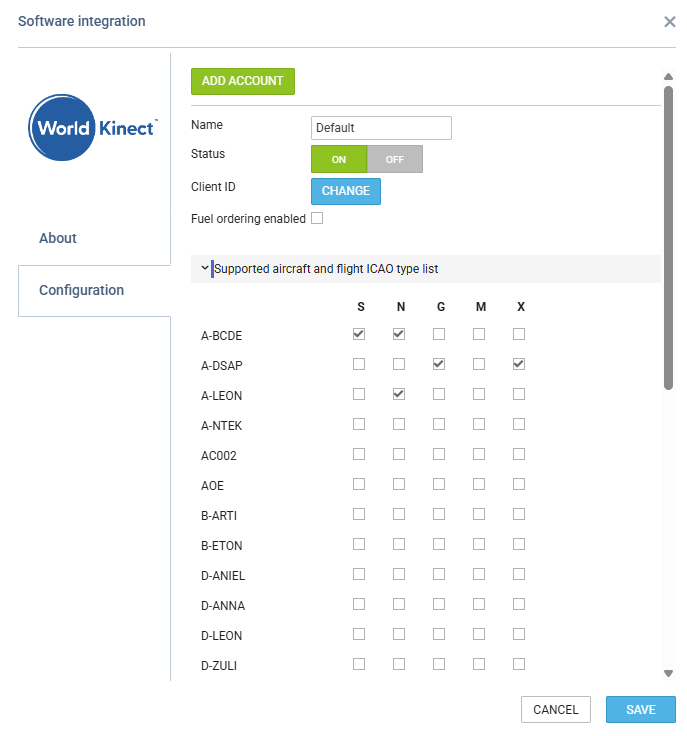
To enable the integration, you need to provide: Leon.
It is possible to add multiple accounts per operator and assign each
-
Account name
-
Client ID
-
Supported aircraft and ICAO flight types
How Leon selects the WKC account for a flight
When you use more than one WKC account, Leon selects the account for each flight based on the combination of the flight's aircraft and its ICAO flight type. In the settings of each account, select:
-
Aircraft - the tails the account applies to
-
ICAO flight types - the types of flight the account applies to
This lets you use different WKC accounts for different kinds of flights operated on the same aircraft.
The configurations of different accounts cannot overlap - each combination of aircraft and ICAO flight type can be assigned to only one account.
Accounts set up before this change have all ICAO flight types selected, so they keep working as before.
Once the integration is enabled:
-
The price will appear with supplier name World Fuel Services - contract
-
‘WFS’ fuel upload will be removed from the OPS > ‘Fuel Prices’ section
-
‘WFS’ fuel prices will appear in the OPS > ‘Fuel Prices’ section if applicable to searched airport
-
Fuel prices from this source will be shown in OPS -> Fuel, when the

button is clicked
