

Centrik
Centrik is an operational management system that provides you with the tools you need to manage your business in any regulatory climate. Centrik is an easy-to-use interface that makes filing reports or checking your operational status with modules to manage Risk, Safety, Compliance, Manuals, Documents, Meetings, Training and much more.
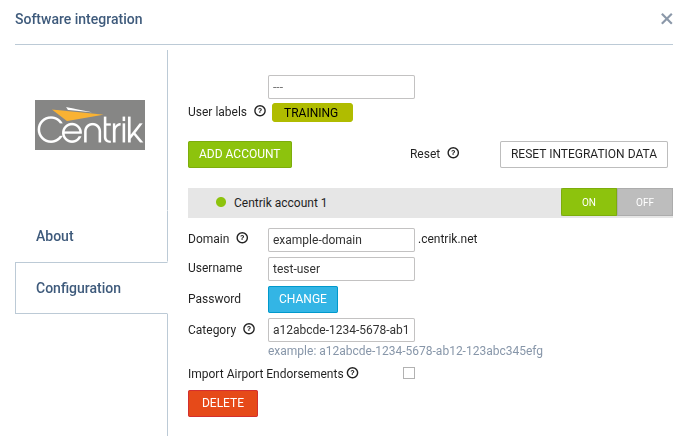
To activate the integration, simply switch the ON button in the Configuration section. Next, enter your Centrik credentials — domain, username, and password — and save the configuration.
You can also assign user labels to specific crew members in Leon. Certificates will be synchronized only for users who have the designated label assigned and selected in User labels section above Centrik credentials.
Optionally, you can also insert the “Category ID” information (“Training System ID”), if you need to limit endorsements loaded from Centrik to a particular category. In order to receive the string reflecting “Category ID” you need to contact Centrik support and they will provide you with one.
RESET INTEGRATION DATA button allows reloading all Centrik endorsement data with one click. The process of resetting the endorsements might take a few minutes depending on the number of records.
If you remove the label from a specific user and then click Reset Integration Data, that user’s Centrik certificates will be removed from Leon.
How it works
Once the integration is completed, Leon will download the endorsement definitions and the endorsements for particular Crew from Centrik. Leon will not replace existing Leon endorsements with the downloaded ones but will create additional records in the endorsements list. It is the Client’s choice to remove the non-relevant ones.
The Crew endorsements are matched by User email address. If the email addresses between Centrik and Leon a different for a particular User, Leon will not be able to match and download the endorsements for the User.
Changes to endorsement in Centrik will update endorsement details in Leon. The new endorsement in Centrik - if there is a new endorsement added in Centrik, Leon will update the record with the new one.
In a section Crew > Endorsements those imported from Centrik appear with Centrik Logo.

The integration data is reloaded once a day at 20:00 CET/CEST.
Endorsements imported from Centrik are not editable.
Leon also downloads crew endorsements for airports. To set this up, an operator needs to go into ‘Centrik Qualification Set Up’ and within each Qualification enter the ICAO or IATA code into the External ID field
Leon will update data downloaded from Centrik every 6 hours at 12 minutes past the hour in UTC, ie 00:12, 06:12, 12:12, and 18:12. Turning the Centrik integration off removes all imported endorsements from Centrik in Leon endorsements page.
For more information and technical guidance, visit the website: https://centrik.net/