

Swiss AviationSoftware unites 30 years of IT experience with profound MRO expertise and offers its customers the functionally unsurpassed and technologically state-of-the-art maintenance system AMOS.
AMOS is a comprehensive, fully integrated software package that successfully manages the maintenance, engineering and logistics requirements of modern airlines and MRO providers by fulfilling demanding airworthiness standards
More information can be found here
How to integrate
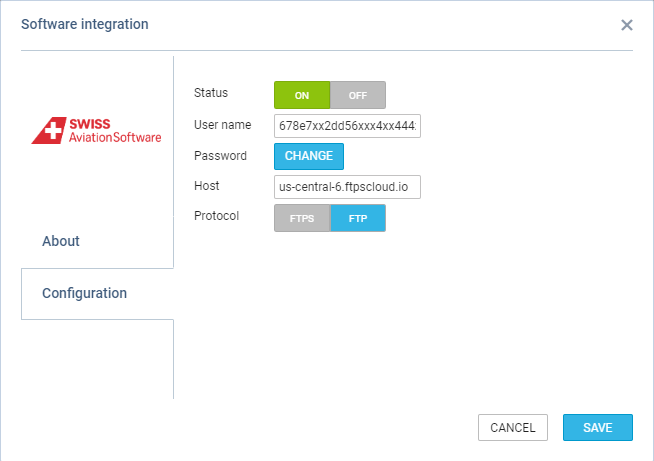
To integrate, the following details are required:
To integrate, the following details are required:
-
Username to FTP/FTPS/SFTP Server
-
Password to FTP/FTPS/SFTP Server
-
Host - selecting either the URL or IP address
-
Selecting the protocol to which the files should be uploaded: FTP, FTPS, or SFTP
Leon will validate the data by trying to connect with the selected server.
Please note that Leon does not provide FTP or SFTP servers.
How it works
Leon generates two types of files and uploads the files to the selected server as follows:
-
Executed flights:
-
Include the flight data generated for the past 7 days from the end of the current day to the beginning of the day 7 days in the past
-
The file is generated and uploaded into the ‘executed_flights’ folder on the server every hour.
-
-
Future flights:
-
Include the flight data generated for the following 6 months from the beginning of the current day until the end of the day 6 months in the future
-
The file is generated and uploaded into the ‘future_flights’ folder on the server every hour.
-