

SchedAero is a leading charter sales management system and is a wholly-owned subsidiary of Avinode Group. The integration allows for transferring confirmed/booked flights from SchedAero automatically to LEON, in one click. Thus eliminating the need to enter the same trip twice in both systems.
To integrate you need to follow 2 easy steps:
-
Contact sales@schedaero.com to receive the Authorization key. Authorization key is a sequence of letters, numbers and special signs SchedAero provides.
-
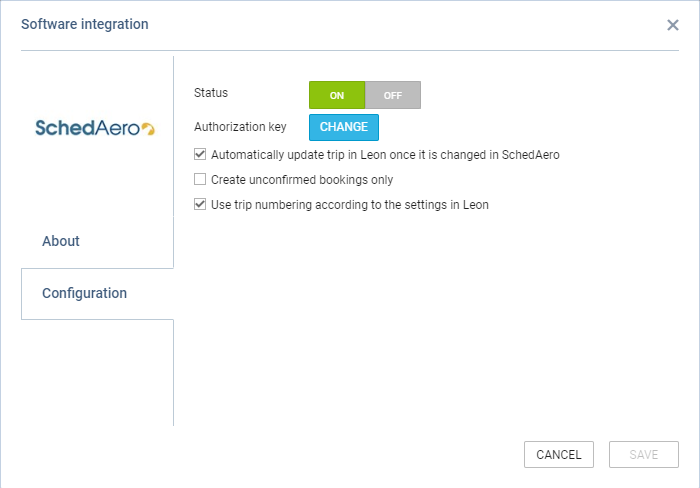
Open the integration window, switch Status to ‘ON’, insert the Authorization key and select the relevant additional settings:
-
Automatically update trip in Leon once it is changed in SchedAero - allows automatically updating the trips in Leon upon any changes in the connected trip in SchedAero
-
Create unconfirmed bookings only - any trips booked from SchedAero to Leon will be created in Leon as unconfirmed trips - Options
-
Use trip numbering according to the settings in Leon - allows assigning Leon trip number rather than the original SchedAero trip number upon booking the trip from SchedAero to Leon
-
-
Save changes
This completes the integration.
The process of sending Trips from SchedAero to Leon is straightforward:
-
Create and confirm quote in SchedAero.
-
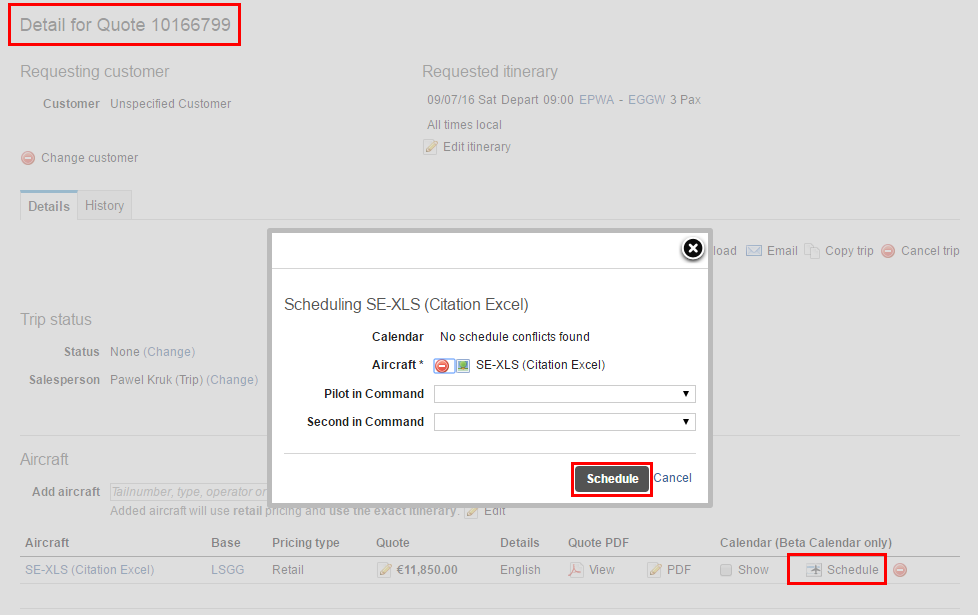
Schedule the quote - once the quote is created, click “Schedule”. A pop-up window will open to schedule this quote. Once the quote is scheduled, the trip will be sent to Leon.
-
New flight in Leon - it takes anything between 30 seconds and 2 minutes for the SchedAero quote to appear as a Trip in Leon. This Trip will hold SchedAero quotation number.
IMPORTANT ! Modifications of any trip in SchedAero, made before integration with Leon is completed, will not be synchronized with Leon