

Auto accept lets Leon answer new Avinode quote requests (RFQs) for you. As soon as a new request arrives, Leon automatically sends Accept to Avinode with a price – just as if someone in your team had clicked Quote. The broker gets your answer within minutes, and your team can focus on the requests where a client shows real interest.
How to turn it on
Go to Settings > Add-ons > Avinode > Configuration, make sure Download requests for quotes is ticked (Auto accept and Price source can be set only then), enable Auto accept and choose the Price source. If you have several Avinode accounts connected, Auto accept is set for each account separately. When Auto accept is switched off, the Avinode integration works exactly as before.
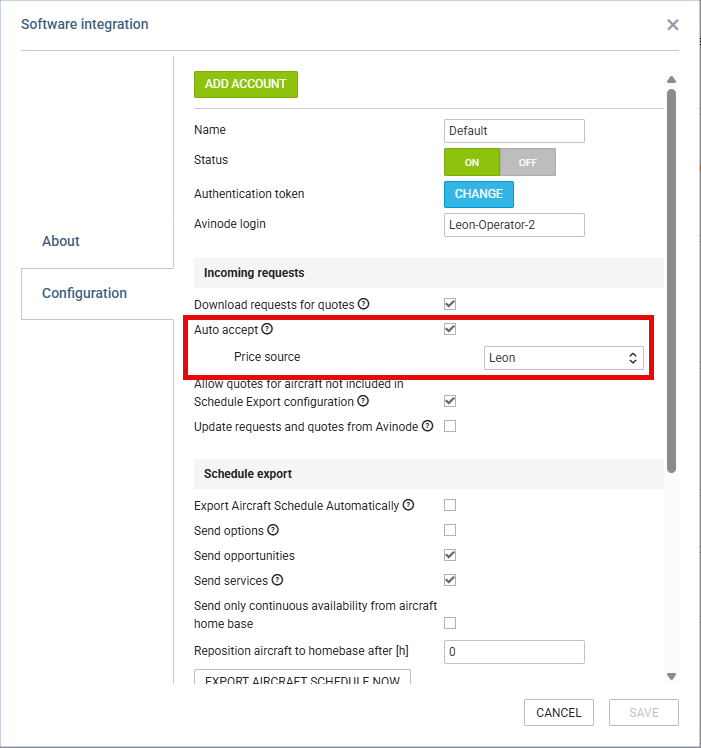
Price source
The price source decides which price is sent to Avinode:
-
AVINODE – the price shown in Avinode is accepted as it is. Leon does not recalculate it and does not add Leon fees.
-
LEON – the price is calculated from the aircraft price list in Leon. An aircraft without a price list is not accepted, because there is nothing to calculate the price from.
If you use the LEON price source, make sure every aircraft you want to quote automatically has a price list set up.
Which aircraft are included
All aircraft are included by default. To leave an aircraft out, open its settings, go to the SYSTEM tab > Avinode section, and untick Include in Avinode Auto accept. The Avinode section is shown only when Auto accept is enabled for at least one Avinode account.
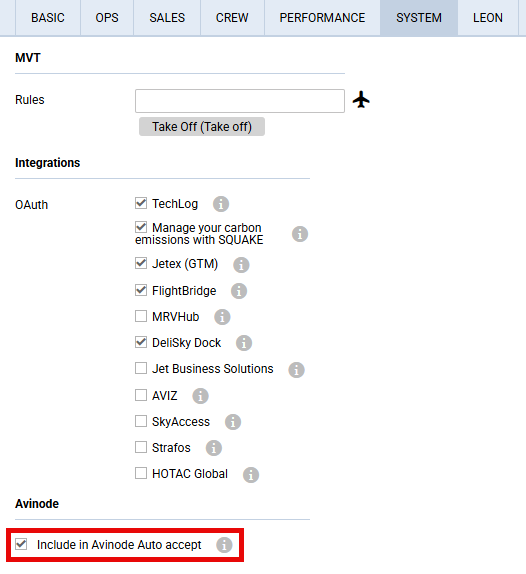
Rules
-
Empty legs are skipped. Auto accept works only for regular quote requests.
-
Only automatically downloaded requests. A request downloaded manually with DOWNLOAD REQUEST FROM AVINODE is not accepted automatically.
-
One answer per aircraft. Each aircraft in a request is accepted only once, with the first quote received for it. Later quotes for the same aircraft (for example, with a new price) are not accepted and do not change the price already sent.
-
Cheapest aircraft wins. When one quote matches several aircraft of the same type, only the cheapest one is accepted.
-
Already answered aircraft are skipped. If an aircraft has already been answered in the request – also manually by your team – Auto accept leaves it alone.
-
Nothing is rejected. Auto accept never rejects other quotes. The “reject unanswered quotes” setting is ignored.
-
Status changes to Quote. After Auto accept sends the answer to Avinode, the request status in Leon changes to Quote, the same as after a manual answer.