

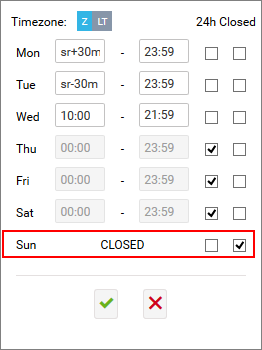
As you can see in the screen apart from standard options of editing Tower Hours, which is inputting “From-To” times and marking 24H checkbox, we have added Closed column with checkboxes for each day.
This allows you to:
-
Mark airport closed - you can do it by simply ticking the checkbox in “Closed” column on a specific day
-
Change hours if airport Closed - if you untick the checkbox Leon will react with accordance to previous hour setting. Most of the time unticking “Closed” checkbox will automatically tick “24H” checkbox, unless Opening hours were input manually. In this case unticking “Closed” checkbox will edit “Opening hours” column where you can input opening hours. Clicking on word “Closed” in “Opening hours” column acts in the way explained above.