

As an administrator you want to be sure that all messages sent to crew are being read by them.
Panel Messages in Leon alerts if there is a new message - an icon 
Now you can set that an email sent to crew by using panel ‘Messages’ - even if it is forwarded to the other email address - will appear without a content. So a crew member will have to enter Leon inbox to familiarize with it.
-
Operator Settings
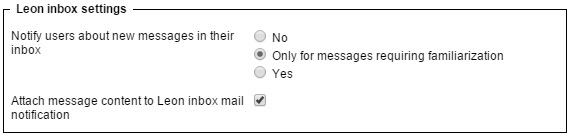
Go to section Admin > Operator Settings > General and in Leon inbox settings mark a checkbox ‘Attach message content to Leon inbox mail notification’. Additionally, you can notify users if a new message arrives.
-
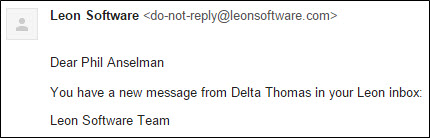
Forwarded message to crew work or personal email address
Such message will have no content - a recipient will have to go to ‘Messages’ in Leon to read it.
-
Message in Leon inbox
If the user clicks on the wrench-icon > messages he will see who the message was sent from, the subject and the date.
