

CO2 Emission report for non-EU flights
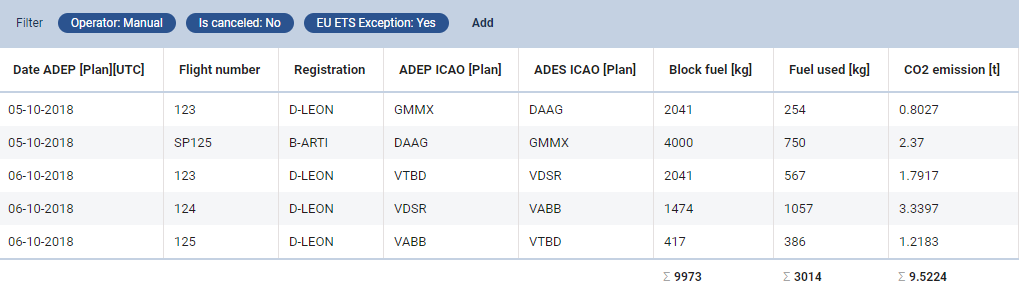
When creating CO2 Emission report via WIZARD report, select appropriate columns in the left filter, such as: CO2 emission, Fuel used, Date, Registration and ADEP/ADES.
Once the report is created, click the filter icon 
If you want a report for EU flights only, select an option ‘NO’ in the filter. You can also use a filter option Europe traffic filter where there are 5 options available:
-
Inside EU - both ADEP & ADES must be within EU borders.
-
Both airports outside EU - both ADEP & ADES must outside EU borders.
-
EU Emission Trading Scheme (ETS) - flights with EU ETS selected in the Journey Log (if JL item ‘EU ETS Exceptions’ is added to JL from Settings > Flight Editing section).
-
Inside geographic Europe - both ADEP & ADES must be within geographic Europe borders.
-
Only inside EU (ETS directive - without CR ↔︎ CR) - flights inside EU apart those within Croatia.
By not selecting the filter Leon will show CO2 Emission report for all flights added to Leon.