CAMO limits
Once there has been an aircraft maintenance scheduled in Leon (described in THIS manual chapter) you can check CAMO limits when editing a trip in Table panel. Click 
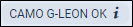
Example: current TAH 450:00 TAC 150; Maintenance limits: TAH 480:00 TAC 165; warning margins: TAH 20:00 TAC 10

Example: current TAH 470:00 TAC 160; Maintenance limits: TAH 480:00 TAC 165; warning margins: TAH 20:00 TAC 10

Example: current TAH 482:00 TAC 167; Maintenance limits: TAH 480:00 TAC 165
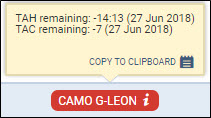
You can check the exact TAH & TAC details when you hover the mouse over one of these three icons: