

Crew Panel
The following changes have been introduced in Crew Panel section:
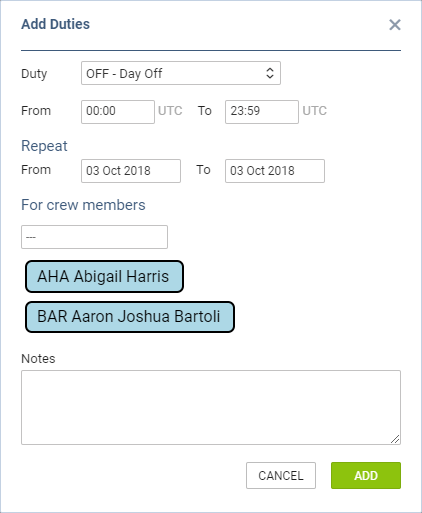
1. Assigning multiple crew members to one duty.
In order to assign multiple crew members you need to:
-
Right click on a given day in the ‘Crew’ part of the page.
-
Select ‘ADD DUTY’ and choose any particular duty.
-
In a pop-up window select crew members you wish to assign this duty to.
-
Click ‘ADD’ button to save changes.
2. Changes to flight colours
In the flights part of the page the colours of flights are as follow:
-
GREEN - flight fully assigned
-
LIGHT GREEN - ferry flight assigned
-
ORANGE - flight partially assigned
-
RED - flight unassigned
3. Changes to duty colours
The duty colours have been standardized depending on duty type:
-

-

-

-
