

Flight Watch changes
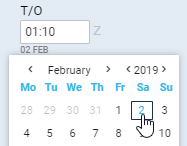
Date of the time input can be selected for each individual box apart from EET.
As soon as you click inside the applicable box Leon will display the date underneath the box in the “ddMMM” format.
To change the date, simply click on the date displayed below the box and choose the new date from the calendar.