

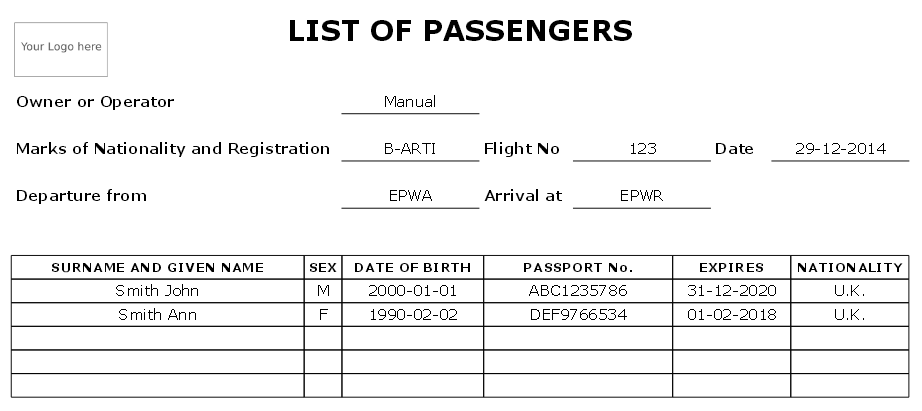
If you add passengers information to Leon manually (which means you don‘t use Pax Database data added to Leon in the section ’Phonebook > Pax Database’) it is still possible to view it on ’Pax Manifest document.
Go to $$Admin$$ > $$Operator Settings$$ > $$General$$ and enable this option by ticking the checkbox Unknown Attachment (at the bottom of the page).
If you hover the mouse over the ‘?’ the information will show up: ‘Show pax list in the text mode on Pax Manifest document. Correct data has to be entered in the format: No. gender surname name date-of-birth passport no. passport expiry date nationality. Columns have to be separatedd by comma.’
The below example explains how it works.
-
Add pax details in the ‘Legs Info’ section
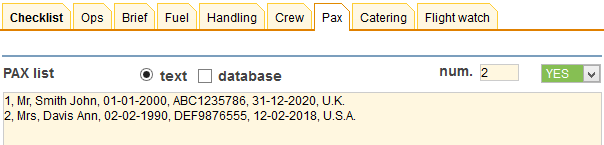
The gender will be displayed as:
-
M if inserted as Mr
-
F if inserted as Mrs, Miss or Ms
-
CHD if inserted as Child
-
INF if inserted as Infant
-
Go to Flights List page - mark appropriate flight/flights in the 1st column, right-click of the mouse and select Pax Manifest document to get pax data.