

Default ALTN airports
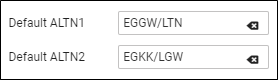
Leon allows to define default alternate airports which will automatically show in a section Schedule (columns ALTN & ALTN2) and in a tab FLIGHT.
Click a tab General and type Default ALTN1 airport’s name or a code, then do the same for Default ALTN2 (not mandatory).
Once ALTN airports are defined Leon will show them in a section Schedule, in brackets (you need to macr a checkbox ‘ALTN’ in the left-hand filter, tab ‘SHOW’ to get columns ALTN & ALTN2 displayed) and also in a tab FLIGHT (see the screenshot on the right).