User National ID
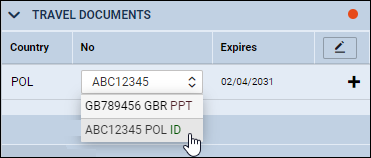
It is now possible to select a ‘National ID’ as a Crew ‘TRAVEL DOCUMENT’ on a flight.
In order to select the ‘National ID’, it needs to be added to the User profile.
First step is editing CREW profile and clicking a button 
Second step is adding details, as displayed on the screenshot:
- **Country** - select a country that issued an ID - **Type** - select National ID type from the dropdown selection that includes 'ID card', 'Military card', 'Residence card', etc - **No.** - insert National ID number - **Date of Issue** - **Expiry date** - **ID scan** - click on the 'UPLOAD FILES' button in order to upload the scan of the document

Once the ‘National ID’ is added it can be selected on a flight in the ‘CREW’ tab > ‘TRAVEL DOCUMENT’ section.