

INSURANCE
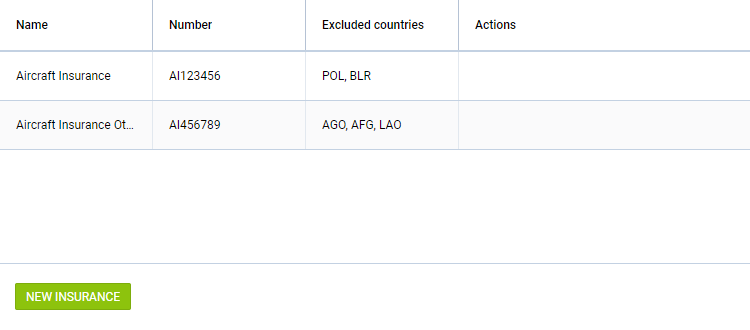
‘Insurance’ section contains the list of Aircraft insurance details and definitions..
The list is presented in the form of a table with the following columns:
-
Name - Insurance name
-
Number - Insurance number
-
Excluded Countries - codes of the excluded countries
-
Actions - hovering the mouse over this column will display the ‘Actions’ available icons. Currently, only the

NEW INSURANCE
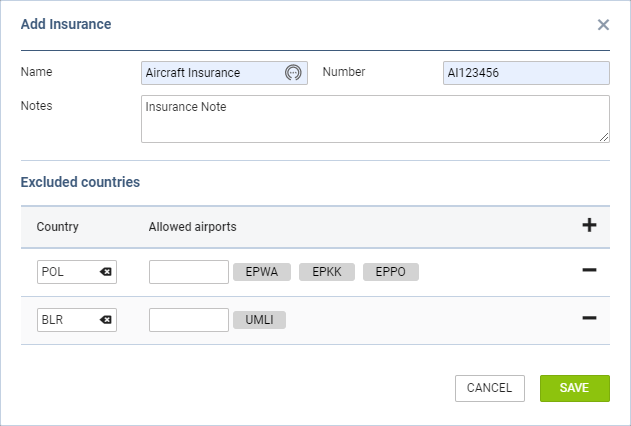
Click on NEW INSURANCE button to create the new insurance definition.
The following fields are available in the ‘Add Insurance’ pop-up window:
-
Name - Insurance name
-
Number - Insurance number
-
Notes - field for additional notes
-
Excluded Countries:
-
Country - code of the country not covered by the insurance. It is possible to insert the name or select the name from the dropdown list and Leon will convert it to the code. Adding or removing rows can be managed by + and - options
-
Allowed airports - exception airports within the excluded country that are covered by the insurance
-
Once the definition is saved, it will appear on the list of insurances.
It is possible to edit the insurance definition by clicking on the insurance name on the insurance list view.
To delete the insurance, click on the
Once the definition is created, it can be assigned to the aircraft:
-
Go to FLEET section
-
Edit the Aircraft
-
Go to ‘SALES” tab - Select the relevant insurance in the ’Insurance’ dropdown (‘Settings’ part) and save changes
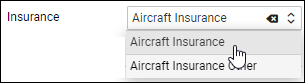
Currently, only one insurance can be assigned per aircraft.